BRIEF
Prototype is a well-established
engineering concept to have thorough understanding, design evaluation and
outcome inspection. Utilizing everything in recursive and optimized fashion,
final Algorithm/Structure/Model emerges as the most practical candidate for
actual/true implementation.
Software Prototyping (Simulation)
is the most recent, highly effective and flexible with minimal cost & time
benefits. Out of a known set of algorithms or new variants of existing
algorithms that might have seemed potential enough must be tested/simulated to
highlight their own advantages and limitations under various degrees of
synthetic environment. They all have to be judged in all respects with actually
implemented and proven algorithms to open up new directions!
Even the selection of a
simulation language or a package is also as crucial as the algorithm. Features
like availability, reliability, easy to use, user-friendly help, fast execution
and the most important is its ability to provide directly or programmatically
all complex and application specific constructs needed for the simulation of
interest.
In case of SAR Imaging, a small
portion of the illuminated ground patch at a given time with a resolution of
interest is considered a Point Target. The key element for ground imaging is a
point target because a given ground patch of illumination can be viewed as a
two-dimensional grid of several point targets. An algorithm which works well
for a point target has to work satisfactorily for a given ground patch and hence
for an entire swath.
There are three major algorithms
for Azimuth Processing (Correlation) to achieve desired Azimuth Resolution.
1
Time-Domain Azimuth Signal Processing (TASP)
2
Frequency-Domain Azimuth Signal Processing (FASP)
2.1
Time Weighted FASP (TW-FASP)
2.2
Frequency Weighted FASP (FW-FASP)
3
Spectral Analysis (SPECAN)
In this Section, the underlying
core essence are tried to be presented…
1
MATLAB as a powerful simulation tool.
2
Importance of a point target in calibration of SAR processing
algorithms.
3
End-to-end design understanding and verification of actually implemented
Time-Domain algorithm with the help of MATLAB simulation.
4
An approach to a Frequency-Domain algorithm with two innovative ideas of
Weighting in Time and Weighting in Frequency.
5
Results of Time-Domain & Frequency-Domain simulations and a
comparative study of various outcomes and interpretations.
For both Time-Domain & Frequency-Domain
Azimuth Signal Processing simulations in MATLAB, certain assumptions are
followed to avoid unnecessary complexities.
·
Point target geometry in context to Air-borne SAR in
·
Ideal, stable radar platform with no spatial motion, straight- linear
flight path of air-craft with constant velocity.
·
Uniform illumination & scattering for the ground patch and symmetrical
horizontal & vertical Beam-width of a Monostatic Antenna.
·
No RCMC (Range Cell Migration Correction).
·
No Radiometric and Geometric Correction.
Selected parameters for a given system and
various formats of Azimuth Resolution & ISLR for both the simulations with
ideal & noisy conditions are shown here as look ahead clues.
Requirements:
Azimuth Resolution: At least 6m or better.
ISLR (dB): Maximum (in absolute form) as
possible.
System Parameters:
Antenna Length: 1.3 m, Antenna
Width: 8 to 9 cm
Antenna Look Angle: » 60°
Air-craft Velocity: 120 m/s,
Air-craft Altitude: 6000 m
Center Frequency/ Wavelength of
Transmitted Chirp: 5.3GHz/ 5.6cm
Shortest
Swath-width: 25000 m
Processing Bandwidth for given Resolution:
20Hz+ dbw tolerance = 26Hz to 31.25Hz
Various formats of
Azimuth Resolution/ ISLR as End Results (Outcomes):
1
 Time-Domain (TASP)
Without Weighting (No Noise): ________m, _______dB
Without Weighting (With Noise): ________m, _______dB TASP
With Weighting (No Noise): ________m, _______dB
With Weighting (With Noise): ________m, _______dB
2
Frequency-Domain (FASP)
 Without Weighting (No Noise): ________m, _______dB TW-FASP
 Without Weighting (No Noise): ________m, _______dB FW-FASP
With Weighting in Time (No
Noise): ________m, _______dB
 With Weighting in Time (With
Noise): ________m, _______dB TW-FASP
With Weighting in Time (With
Noise): ________m, _______dB TW-FASP
With Weighting in Freq (No
Noise): ________m, _______dB
With Weighting in Freq (With
Noise): ________m, _______dB FW-FASP
CHAPTER
1: MATLAB - A VERSATILE
SIMULATION TOOL
S2.C1.1 WHAT IS MATLAB?
MATLAB is a high performance language for technical computing. It integrates computation, visualization, and programming in an easy to use environment where problems and solutions are expressed in familiar mathematical notations with high precision. Typical uses include:
·
Math
and computation
·
Algorithm
development
·
Modeling,
simulation and prototyping
·
Data
analysis, exploration and visualization
·
Scientific
and engineering graphics
·
Application
development including Graphical User Interface building
MATLAB
is an interactive system whose basic data element is an array that does not
require dimensioning. This allows us to solve many technical computing
problems, especially those with matrix and vector formulations, in a fraction
of time otherwise it would take to write a huge program in a scalar,
less-interactive languages such as C or Fortran. Inherent vectorization of
large data can significantly reduce the program code structure and internal memory
management of MATLAB frees user from a great overhead.
The name MATLAB stands for MATRIX
LABORATORY. MATLAB was originally written to provide easy access to matrix
software developed by LINPACK and EISPACK projects, which together represent
the state-of the art in software for Matrix computation. MATLAB has evolved
over a period of years with input from many users. In university environments,
it is the standard instructional tool for introductory and advanced courses in
Mathematics, Engineering and Sciences. In industry, MATLAB is the tool of
choice for high productivity research, development and analysis.
MATLAB features a family of
application-specific solutions called toolboxes. They are very important to the
high end users who are involved in learning and applying specialized
technology. Toolboxes are comprehensive collection of MATLAB functions that
extend the power of MATLAB environment in solving particular classes of
problems. Following is the list of a few representative toolboxes of an ever-expanding
library of toolboxes: Signal Processing, Control Systems, Neural Networks,
Fuzzy Logic, Image Processing, Wavelets, Statistics and many others.
S2.C1.2 MATLAB
SYSTEM
The MATLAB System consists of
five main parts:
2.1
The MATLAB Language : This is a high-level Matrix/Array language with control flow
statements, functions, data structures, input/output, and object-oriented
programming features. It allows both “Programming in the Small” to rapidly
create quickly and dirty throwaway programs and “Programming in Large” to
create complete large and complex application programs.
2.2
The MATLAB Working Environment : This is the set of tools and facilities
that you work with as a user or programmer. It includes facilities for managing
the variables in your workspace and importing and exporting. It also includes
tools for developing, managing and profiling M-files, MATLAB’s applications.
2.3
Handle Graphics : This is the MATLAB graphics system. It includes high-level commands
for two-dimensional and three-dimensional data visualization, image processing,
and animation and presentation graphics. It also includes low-level commands
that allow you to fully customize the appearance of graphics as well as to
build complete Graphical User Interface on your MATLAB applications.
2.4
The MATLAB Mathematical Function Library :
This is a vast collection of computational algorithms ranging from
elementary functions like sum, sine, cosine, and complex arithmetic to more
sophisticated functions like Matrix inverse, Matrix Eigen values, Bessel
functions and Fast Fourier transforms.
2.5
The MATLAB Application Program Interface (API) : This is a library that allows
you to write C and Fortran Programs that interact with MATLAB. It includes
facilities for calling routines from MATLAB, calling MATLAB as a computational
engine, and for reading and writing MATLAB- files.
S2.C1.3 OTHER
MODULES
Simulink, a companion program to MATLAB,
is an interactive system for simulating non-linear dynamic systems. It is a
graphical mouse driven program that allows you to model a system by drawing a
block diagram on the screen and manipulating it dynamically. It can work with
linear, non-linear, continuous-time, discrete-time, multivariable and
multi-rate systems. Block-sets are add-ins to Simulink that provide
additional libraries of block for specialized applications like Communications,
Signal Processing and Power Systems. Real-time Workshop is a program
that allows you to generate C code from your block diagram and run it on a
variety of Real-time systems.
S2.C1.4 MATLAB
& SIMULATIONS CARRIED OUT
The given tasks viz. Point Target
Simulation and Azimuth Signal Processing of SAR return, in both Time-Domain and
Frequency-Domain are explored with a versatile MATLAB. Lot of utilities helps
to reduce the time without elaborate coding. It has been found that MATLAB with
Signal Processing Toolbox is an ideal environment for simulation of a Point
Target, a reliable reference for design parameters modeling, verification in a
short time duration. It is also useful in strategic algorithm planning for
Real-time implementation, which may be of long duration, quite complex,
unforeseeable and sometimes unpredictable.
In the simulations carried out,
only hand coding is used with M-files and functions instead of using Simulink.
M-file gives complete control over the algorithm flow and reliable output
judgment to the alterations of design parameters and offers good amount of
flexibility and tractability.
Workspace concept has the
wonderful advantage of preserving the past variables and automatic memory
management and this feature relieves the task of handling File-I/O. Very easy
plotting function with different color and style options is the key of
effective waveform display and analysis. The biggest advantages are the complex
multiplications, Squares, Square roots by vectorization in a single shot.
Signal Processing Toolbox contains key utilities like FIR Filter design,
Convolution, FFT, IFFT, Decimation, Interpolation, etc.
Because of availability of such
utilities:
·
More time was given for understanding highly mathematical and abstract
SAR theory.
·
It was possible to simulate and verify end-to-end TASP algorithm in
short time duration.
·
Innovative implementations of FASP algorithm were successfully carried
out.
CHAPTER 2: POINT
TARGET
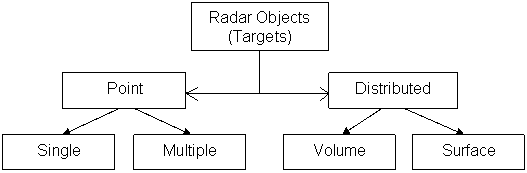
S2.C2.1 RADAR TARGET CLASSIFICATION
Target
classification requires that the radar measure with sufficient accuracy a set
of target parameters that will permit it to be as a member of (or rejected as
not belonging to) a class of objects the system is intended to detect, and to
which it is intended to react. These classes may be broad or narrow, but will
fall within those shown in Figure S2.C2.D1.
S2.C2.D1
Examples of Single or Multiple
Targets are air-craft, helicopter, ballistic target, bird, man, corner
reflector, ground vehicle and
any distinct object with uniform scattering and probably having some shaped
geometry of smaller or moderate dimensions. Clouds, aurora and large sea
targets are the examples of Volume Targets. Water surface, bushes, forest and
arable land fall in to Surface Target classification.
S2.C2.2 WHAT IS POINT TARGET AND WHY POINT TARGET
?
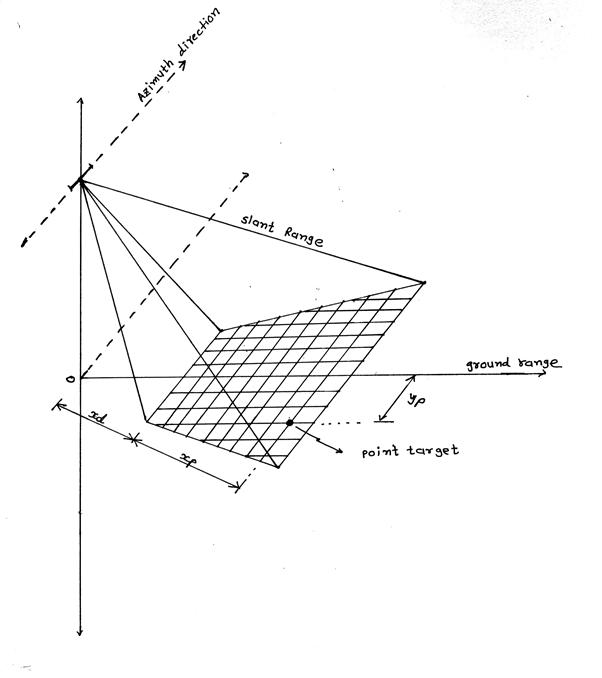
In high resolution SAR imaging, return signal is always a vector sum of scattering from various kinds of distributed targets with different properties within the illuminated ground patch. Any target (object) can be seen as or modeled as a Point Target or a set of Point Targets if it gives uniform scattering piecewise (part-wise) over the whole structure, or its dimensions (complete/part-wise) are comparable with the resolution of our interest. For the ground-mapping problem with SAR, the ground area (patch) illuminated by the narrow azimuth beam-width antenna is viewed as a 2-dimensional grid of several point targets as shown in Figure S2.C2.D2. In general even though the ground area consist of flat land, a rocky ridge, bushes, forest, sea-water, man made structures, animals, human or vehicles, has the validity of point target analysis, and any algorithm calibrated for a point target holds equally good in dealing with a massive data set associated with entire swath imaging case.
S2.C2.D2
S2.C2.3 POINT
TARGET GEOMETRY FOR ASAR
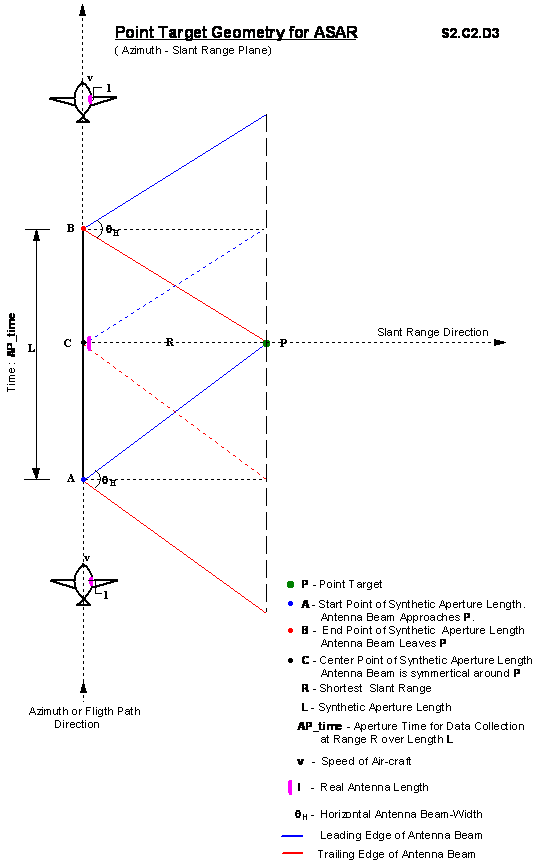
In Figure S2.C2.D3 & in Figure S2.C2.D4 Point Target Geometry for ASAR in Azimuth-Slant Range plane (Top view) and in Range-Altitude plane (Elevation view) is depicted respectively. First Figure S2.C2.D3 tells about the Synthetic Aperture Length, Aperture Time for data collection and total Doppler Bandwidth from the parameters like
·
The shortest Slant Range distance between air-craft
and point target
·
Velocity
of air-craft, actual Antenna Length and Wavelength
·
Horizontal
(Azimuth) Antenna Beam-width qH
Second
Figure S2.C2.D4 tells about the Vertical (Range) Beam-width qV of the antenna, Antenna Look Angle, distance of the
swath from Nadir track and Swath-width.

S2.C2.D3
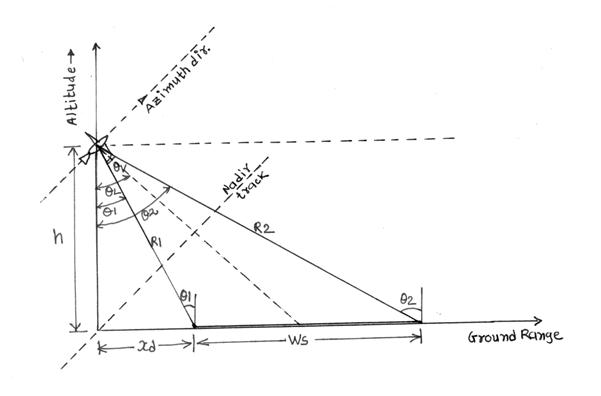
R1 - Minimum
Near Slant Range = 8000 m
R2 - Maximum
Far Slant Range » 32000
m
q1,q2 – Incidence Angles, q1 » 41.40°, q2 » 78.79°
qv – 3dB
Vertical Beam-width, Range Beam-width » 37.38°
qL –
Look Angle » 60°
Ws – Swath-width » 25 kms
h – Altitude » 6000 m
xd » 5.29 m
S2.C2.D4
S2.C2.4 DATA
COLLECTION, STORAGE & PROCESSING
As such there is no need to have
data collection and storage for a point target simulation. LFM (Chirp) data
(samples) are generated in MATLAB, which are analogous to a data set (some
single column) for a given Range Gate, of actually mapped 2-D data gathered
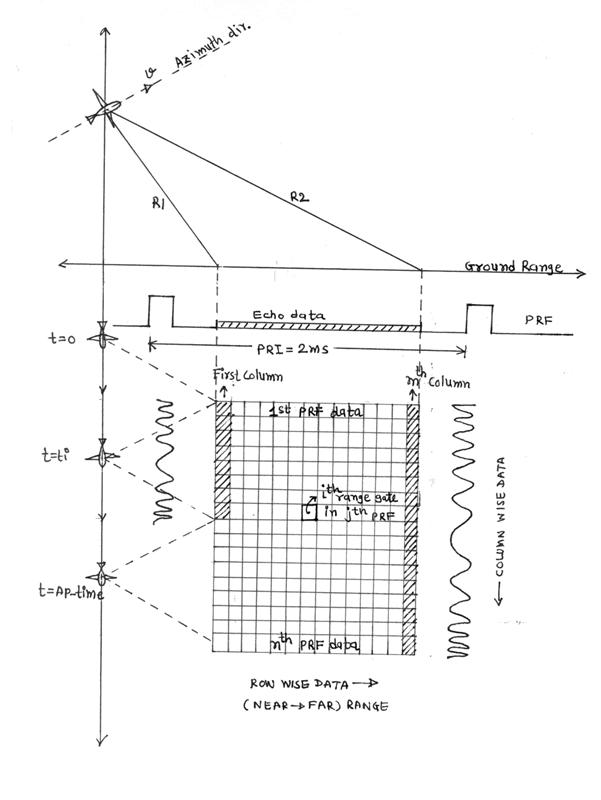
during the observation time. Figure S2.C2.D5 illustratively clears the whole
picture of 2-D data organization. Every PRF (Pulse Repetition Frequency) return
is stored row wise from near-to-far range and each element (data) in that row
corresponds to a single resolution cell in the range direction. The collection
of such several PRF returns stacked together forms equal numbers of columns as
the number of range gates or range cells in Range direction. Near Range column
has a smaller dimension compared to a Far Range column because of different
Aperture Time and different Synthetic Aperture Length for different Range
Gates. Intersections of all rows and columns give formation of 2D cells, any
one of that is identified as ith range gate in jth PRF
return. Interestingly the data set, a sampled version of a return signal in
both range and azimuth directions carry the LFM (Chirp) nature. Of course LFM
shape row-wise is obvious, as the transmitted signal is LFM only and there is
only a point target to interact with it, but because of Doppler effect the same
constant transmitted frequency for all cells in a given column (Range Gate)
takes the LFM shape when viewed as a return. This phenomenon called Doppler
effect is the result of relative motion between a steady point target on the
ground and a moving radar platform on the air-craft.
Now with the clear idea about 2-D
data organization, processing is the implementation of various algorithms on a
selected data set. Out of two basic types of signal processing (correlation)
required for high-resolution ground imaging,
1
Range processing &
2
Azimuth processing, it is assumed to have Range processed data available
for further Azimuth processing.
Here the row wise data in 2-D
space are assumed to be Range compressed (processed). Azimuth processing is
done to improve the Azimuth Resolution of the ground image. Time-Domain (TASP)
and Frequency-Domain (FASP) are the two fundamental approaches with different
implementation requirements, trade-offs, advantages and limitations generally
used for Azimuth Signal Processing. Both approaches for a given point target
rely on a same data set (ith column of n 1-D samples) which is
generated by LFM equation in MATLAB workspace.
S2.C2.D5
S2.C2.5 END RESULTS
After processing a given data set
having LFM shape turns to be a sharp long peak with several side lobes. The
amplitude of the peak is mapped with some intensity level to a corresponding
pixel on the display monitor representing the characteristic of a point target.
Quality of image and ground feature extraction depends on the following two End
Results (outcomes) that can be derived from finally processed data set
(registered data) having a distinct peak and side lobe nature.
1
Azimuth Resolution
2
ISLR (Integrated Side Lobe Ratio)
Registered data set is quite
small in dimension due to moderately small Azimuth Resolution and multi-look
processing necessity in practical situations. As shown in Figure S2.C2.D6, to
estimate the End Results in effective manner, registered data is interpolated
by some suitable factor, and from the magnitude response of the interpolated
data, number of samples within 3-dB threshold are calculated. These samples are
the spatial 3-dB resolution samples.
Azimuth Resolution is directly
proportional to the number of 3-dB resolution samples. Formulation of exact
equation for Azimuth Resolution depends on the approach used for processing. It
tells about smallest possible ground feature extraction.
ISLR (dB) is the ratio of energy
contained in significant side lobes around the peak and the energy within 3-dB
of a peak response. ISLR tells about an image quality in terms of inter pixel
interference, blurring or the sharpness of extracted features.
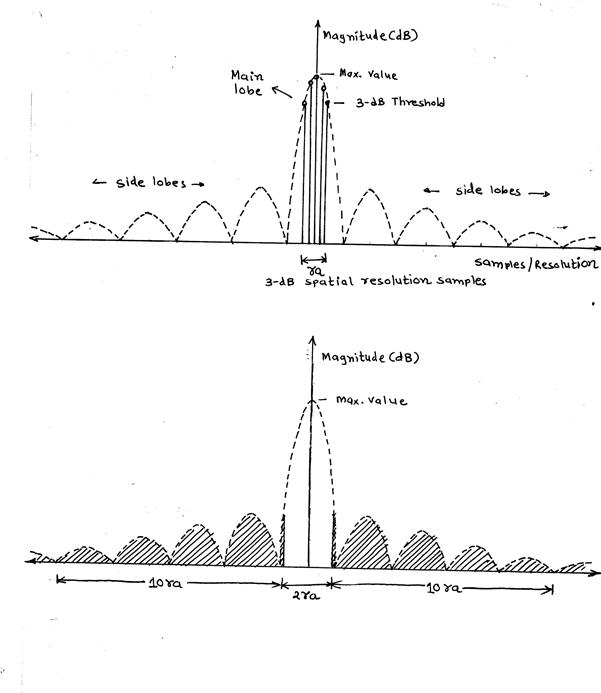
ISLR = Energy of the Shaded Area
Energy of the non Shaded Area
ra = Number of 3dB
resolution samples
S2.C2.D6
CHAPTER 3: PARAMETERS & EQUATIONS
For
a point target simulation certain system dependant parameters are involved,
that characterize the real SAR system. Such standard parameters are listed with
their values for both simulation approaches.
There
are some flexible variables or parameters, some are common to both approaches
others are algorithm selective. As an example Slant Range R is a common
variable and has been by default taken as 8000 m.
Very
important equations related to SAR signal processing used in both the
approaches are also listed below.
S2.C3.1 FIXED-
STANDARD PARAMETERS
·
Antenna Length: l = 1.3 m, Antenna Width: w = 8 to 9
cm
·
Transmitted Signal Wavelength: l = 0.056 m, Frequency: f = 5.3 GHz
·
Speed of Air-craft: v =120 m/s
·
Pulse Repetition Frequency: PRF = 500 Hz, Antenna
Look Angle: qL » 60°
·
Minimum Slant Range: R1 = 8000 m, Maximum Slant
Range: R2 = 32000 m
·
Air-craft Altitude: h = 6000 m
·
Swath-width: Ws = 25000 m
S2.C3.2 IMPORTANT
EQUATIONS
·
Horizontal Beam-width qH = l/l, Vertical
Beam-width qV = l/w
·
Total Doppler Bandwidth TB = 2.v/l, TB = k. AP_time
·
Chirp Rate k = 2.v2/l.R
·
Synthetic Length L= l.R/l, L = v.Ts
·
Aperture Time AP_time = l.R/l.v = L/v
·
Number of Samples Nsamp = AP_time.prf
·
Bandwidth selected for required Azimuth Resolution
bw, bw = k.t, t = time
·
Range Resolution (Slant) dRs = c.t/2, t = Compressed pulse width
·
Range Resolution (Ground) dRg = c.t/(2.sinqi), qi = Incident
angle
·
Azimuth Resolution dAz = v/bw
CHAPTER
4: TIME - DOMAIN APPROACH
(TASP)
S2.C4.1 ALGORITHM
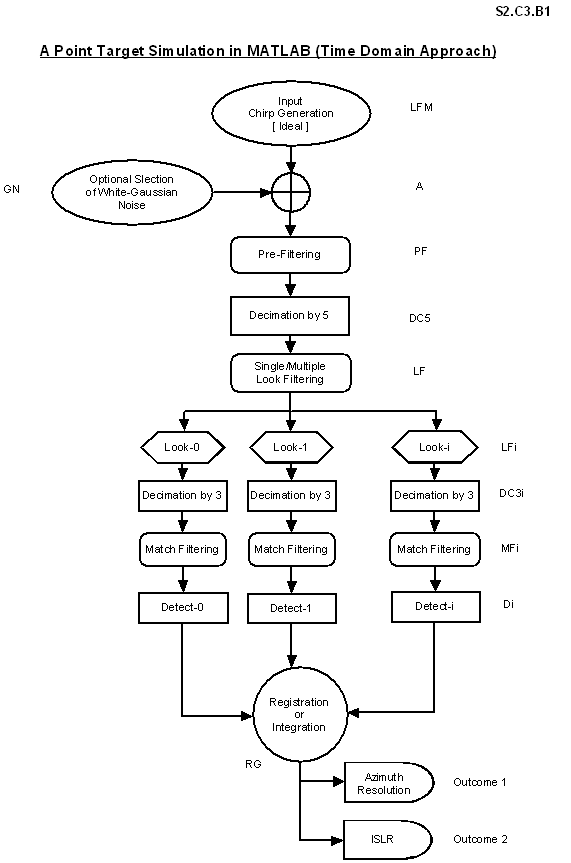
Basic block diagram and algorithm flow for Time-Domain
approach is shown in Figure S2.C4.B1. Also an acronym guide and program flow
supplement is attached in tabular form in Figure S2.C4.T1. The sequence of
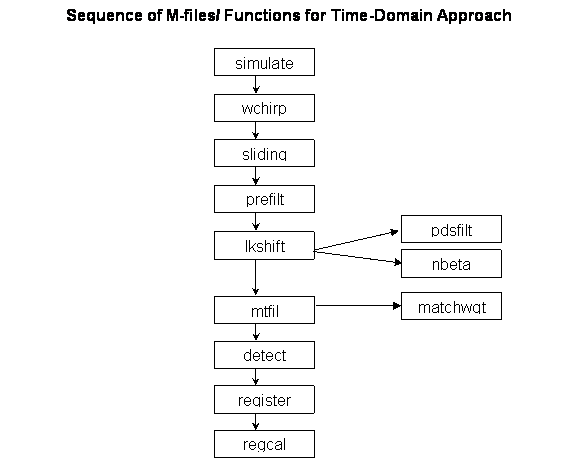
MATLAB m-files/ Functions is shown in Figure S2.C4.D1. All these three figures
are very crucial for further enhancement, modifications and development.
Time-Domain approach can be simulated through simulate.m as shown in
Figure S2.C4.D1.
The entire processing is in digital domain, hence
anywhere the term signal means samples only, even though for better presentation
it can be plotted in continuous form in MATLAB figures at several stages during
simulation.
S2.C4.D1

S2.C4.B1
Acronym and Program Flow Supplement for Time-Domain Approach
|
Block Acronym |
Block
Name |
Description
|
Input
to the Block |
Output
of the Block |
|
LFM |
Linear Frequency Modulation |
Generates an Ideal Input Chirp Signal |
Runtime? R
|
yo |
|
GN |
Gaussian Noise |
Generates White Gaussian Noise of Specified Power |
Runtime? Noise pset |
g_noise1 or g_noise |
|
A |
Addition
|
Adds Ideal Input Chirp with White Gaussian Noise |
yo g_noise 1 or g_noise |
y |
|
PF |
Pre-Filter |
Selects the required bw from total Doppler bw based
on number of Looks |
y |
c |
|
CD5 |
Decimate by 5 |
Decimates the Pre-filtered signal by 5 |
c |
cd |
|
LF/LFi |
Look Filtering |
Separates desired number of Looks by filtering
Pre-filtered & decimated signal |
cd--cd1,cd2 |
lki |
|
DC3i |
Decimate by 3 |
Each look signal is again decimated by 3 |
lki |
lkdi |
|
MFi |
Match Filtering |
Look filtered & decimated i/p signals are
convoluted with Reference Function |
lkdi |
mfoi |
|
Di |
Detection |
Peak responses after match filtering are converted
to magnitude responses without phase information |
mfoi |
dmfoi |
|
RG |
Registration |
Registers or integrates the detected peaks at
different times by non-coherent averaging |
dmfoi |
rg |
|
EST3dB |
3dB Estimation |
Estimates number of samples with in 3-dB of maximum
Registered output Peak. |
rg |
ra |
|
Outcome1 |
Outcome 1 |
Presents Azimuth Resolution as the First Image
Quality Predictor |
ra |
Azres |
|
Outcome2 |
Outcome 2 |
Presents ISLR as the Second Image Quality Predictor |
ra |
ISLR |
S2.C4.T1
S2.C4.2 BLOCKWISE
DESCRIPTION
2.1.
Block LFM represents the
simulated version of received return in azimuth direction for a given range
over a defined Aperture Time with LFM/Chirp equation as below
yo = exp (j.p.k.t2)
.....................................................….(2.4.1)
Here yo is an ideal Chirp without any noise
effect.
2.2.
Block GN generates Additive
White Gaussian Noise. It is possible to generate Real as well Complex noise
with desired power level of 0.5, 1, 2 or 5 times the complex input signal power
yo, which has a unit complex power, obvious from equation 2.4.1. Real noise is
denoted by g_noise1 and Complex noise is by g_noise.
2.3.
Block A presents the
point-to-point addition of input Chirp yo and Gaussian noise g_noise1 or
g_noise. It makes an ideal Chirp noisy and offers a better model of truly
received return as
y = yo+0 or y = yo+g_noise1 or y = yo+g_noise...........(2.4.2)
If the inserted noise power is zero then y
has the same power as yo because the power of y is an addition of power of yo
(i.e. 1) and power of Gaussian noise.
2.4.
Block PF represents a
Pre-filter. The spectrum of input Chirp y is quite large and has a total
Doppler bandwidth
TB = 2.v/l
...............................................…………….…(2.4.3)
For any moderate Azimuth
Resolution we need only a small portion of this total Doppler bandwith as per
dAz = v/bw Þ
bw = v/dAz...............................………………..(2.4.4)
But the inherent problem of
multiplicative speckle noise associated with Active Microwave Remote Sensing
forces to go for multi-look processing overhead. Hence minimum bandwidth for
multi-look processing is number of look times the bandwidth (bw) calculated in
equation 2.4.4. The job of Pre-filter is to separate out the required bandwidth
portion of the whole Doppler spectrum for multi-look processing.
There are various ways of
Pre-filter design. In this application Pre-filter is designed as a Low Pass FIR
Filter with different windowing option, and with Actual and Custom Tap Lengths.
Parameters needed for a low pass FIR filter design are passband and stopband
cutoff frequencies, amount of allowable ripple and a sampling rate. The
stringent requirement of minimum side lobe levels with less broadening for a
given custom tap length finally ends up with a choice of Kaiser window. End
Results of the algorithm implementation or Image quality predictors depend on
the tightness or the looseness of a Pre-filter. Implementation of a Pre-filter
in Time-Domain is the convolution of input Chirp y and selected window
co-efficients, results in a filtered signal c for further processing.
2.5.
Block DC5 decimates a Pre-filtered signal c by an integer factor
5 to simulate the need of data reduction for Real-time processing without much
adverse effect on the quality of final image. Decimated signal cd is, now with
a data size and sampling frequency reduced by an amount equal to the same
integer factor (i.e. 5 here).
2.6
Block LE/LEi means Look Extraction or Look Filtering. The
decimated signal contains a bandwidth more than the required for a single look.
Look Filtering helps in segregation of several looks for independent and
simultaneous processing, and speckle reduction. There are two ways for Look
Filtering,
1
Design a Low Pass Filter with a fixed spectrum, and shift the input
signal spectrum as required by exponential multiplication in time.
2
Transformation of LPF to BPF, shifting of spectral response of BPF as
required and keeping input signal spectrum stationary.
The first method is explored here
in view to adopt the same design methodology of Pre-filter with only changes in
supplied parameters for Look Filter. Analogous to shifting of input spectrum in
frequency is multiplication in time by an exponential factor. Depending on look
bandwidth and number of multi-looks, it is at least marginally convenient to go
for first method. Here the tightness or the looseness of the filter contributes
a lot to the computation as a result of precise bandwidth extraction for each
look. Amount of variations in shifting
of input signal spectrum is also a significant factor.
Original input- decimated signal
cd and its exponential multiplied versions cdi (equation 2.4.5) as an input to
Look Filter produce look filtered output signals lki by the same convolution
approach.
cdi= cd. exp( ± j.2.p.f0.t).........…………....................….(2.4.5)
2.7
Block DC3i again represents
decimation of Look Filtered signal lki by 3; picking up every third sample of
the sequence only. Output signals after DC3i are lkdi.
2.8
Block MFi is a Match Filter
bank. Corresponding to each Look Filtered signal there is one Match Filter.
Match Filter represents a pre-determined Reference Function similar to input
Chirp but smaller in length. Match Filtering is the process of correlation
between Reference Function and Look Filtered signals lkdi. It gives sharp peak
response mfoi at different time indices for different looks.
2.9
Block Di is a Detection
process. Peak responses after Match Filtering are complex valued. Detection
means conversion of such complex valued signals to their magnitude (absolute)
form, suitable for an image display. Information about phase is lost at this
point. Detected outputs are dmfoi.
2.10
Block RG models
Registration/Integration process of all detected looks, means the absolute peak
responses at different time indices are non-coherently added and averaged. It
reduces speckle noise and gives better image quality. Registered output is rg.
2.11
Outcomes: Determination of End
Results/Outcomes is subsequent to the registration process. Registered output
rg is small in size due to decimation by a factor of 15 during the whole
process and hence it is interpolated at least by a factor of 15 for better 3-dB
resolution samples estimation. Higher interpolation factors give stable
estimate. With the help of 3-dB resolution samples estimate, sharpness of a
registered peak response is judged in terms of Azimuth Resolution and side lobe
levels & spread in terms of ISLR.
Outcome1: Azimuth Resolution : It is the first End Result
after a long, complex and very involved processing chain. It should be as
minimum as possible for the extraction of very minute ground features with due
clarity. Azimuth Resolution in Time-Domain approach is summarized as...
Azimuth Resolution (dAz) µ v v: Velocity of Air-craft
µ 1/PRF PRF:
Pulse Repetition Frequency
Outcome2: ISLR( Integrated Side Lobe Ratio) : It is the second End Result,
It should be as high as possible in ( - dB scale). It can be summarized as...
ISLR = Total Energy content out of 3-dB
Main Lobe & in all significant Side
Lobes
Energy within 3-dB
Main Lobe
S2.C4.3 RESULTS
At the end, for Time-Domain
Azimuth Signal Processing Approach (TASP), several important design/simulation
parameter selections, effect of parameter variations and effect of noise on the
End Results are shown below as a representative set.
·
System Parameters : ( Side Looking Stripmap SAR)
Velocity of Air-craft- 120 m/s
Actual Antenna Length- 1.3 m,
Antenna Width- 8 to9 cm
Air-craft Altitude- 6000 m
Center Wavelength- 0.056 m
·
Simulation case study :
Slant Range(R) = 8000 m, Chirp
Rate (k) = 63.60 Hz/s,
Aperture Time (AP_time) =2.9028
sec
Number of Samples of i/p Chirp
(No_samp) = 1451,
Synthetic Aperture Length (L) =
348.33 m,
Reference Function Length
(Ref_len) = 13.62
Signal Power = 1, Noise Power
(Real/Complex)= Variable (0,0.5,1,2...100)
Interpolation Factor = 15
3.1
Comprehensive summary of selected Parameter variations for a Point
Target at different Slant Range (Near®Far)
S2.C4.T3.1
|
Parameters ¯ |
Slant Range R (m) from 6000m
Altitude |
|||||||
|
8000 |
10,000 |
15,000 |
20,000 |
25,000 |
30,000 |
32,000 |
||
|
AP_time(sec) |
2.9028 |
3.6284 |
5.4427 |
7.2569 |
9.0711 |
10.8853 |
11.6110 |
|
|
L(m) |
348.33 |
435.41 |
653.12 |
870.82 |
1088.50 |
1306.20 |
1393.30 |
|
|
No_samp |
1451 |
1815 |
2712 |
3629 |
4537 |
5443 |
5807 |
|
|
K(Hz/sec) |
63.60 |
50.88 |
33.92 |
25.44 |
20.35 |
16.96 |
15.90 |
|
|
Rf_len |
13.62 |
17.03 |
25.55 |
34.06 |
42.58 |
51.10 |
54.50 |
|
|
Det_size |
121 |
149 |
218 |
286 |
357 |
425 |
454 |
|
|
Det_pos
|
Aft |
47 |
57 |
84 |
109 |
136 |
162 |
173 |
|
Center |
61 |
75 |
109 |
143 |
179 |
213 |
227 |
|
|
Fore |
74 |
92 |
135 |
177 |
221 |
264 |
282 |
|
|
Det_mag |
Aft |
10.58 |
11.12 |
19.60 |
27.15 |
33.21 |
33.47 |
44.25 |
|
Center |
11.12 |
12.93 |
21.38 |
31.31 |
38.72 |
41.31 |
41.74 |
|
|
Fore |
9.88 |
11.71 |
20.17 |
26.76 |
30.55 |
38.20 |
44.25 |
|
|
Rg_size |
153 |
189 |
274 |
360 |
447 |
533 |
568 |
|
|
Rg_pos |
74 |
92 |
135 |
177 |
221 |
264 |
282 |
|
|
Rg_mag(NW) |
10.53 |
11.92 |
20.38 |
28.41 |
34.16 |
37.66 |
43.41 |
|
|
Rg_mag(HW) |
7.53 |
8.89 |
14.72 |
20.27 |
25.02 |
28.14 |
31.57 |
|
|
ISLR (dB) (NW) |
-9.87 |
-11.05 |
-10.32 |
-9.93 |
-10.85 |
-13.24 |
-11.31 |
|
|
Azres (m) (NW) |
4.80 |
5.52 |
4.80 |
4.56 |
4.80 |
5.28 |
5.04 |
|
|
ISLR (dB) (HW) |
-17.80 |
-17.30 |
-18.17 |
-18.54 |
-18.57 |
-18.97 |
-19.48 |
|
|
Azres (m) (HW) |
6.00 |
5.52 |
5.76 |
5.52 |
5.76 |
5.52 |
5.76 |
|
3.2 Actual Tap Length of Low Pass FIR Filter with 3 different windows
S2.C4.T3.2.1 Pre-filter
|
fpb |
fsb |
Passband/stopband Ripple rp/rs
(dB) |
fs |
Actual Tap Length |
||
|
Boxcar Nbcar |
Hamming Nham |
Kaiser Nkais |
||||
|
39 |
61 |
40 |
500 |
21 |
79 |
53 |
|
39 |
50 |
40 |
500 |
42 |
158 |
103 |
|
39 |
45 |
40 |
500 |
77 |
290 |
187 |
|
39 |
40 |
40 |
500 |
460 |
1735 |
1117 |
|
39 |
61 |
20 |
500 |
21 |
79 |
21 |
|
39 |
61 |
30 |
500 |
21 |
79 |
37 |
|
39 |
61 |
50 |
500 |
21 |
79 |
69 |
|
39 |
61 |
60 |
500 |
21 |
79 |
85 |
S2.C4.T3.2.2 Look
Filter
|
fpb |
fsb |
Passband/Stopband Ripple rp/rs (dB) |
fs |
Actual Tap Length |
||
|
Boxcar Nbcar |
Hamming Nham |
Kaiser Nkais |
||||
|
13 |
20.33 |
40 |
100 |
13 |
48 |
33 |
|
13 |
20 |
40 |
100 |
14 |
50 |
33 |
|
13 |
15 |
40 |
100 |
47 |
174 |
113 |
|
13 |
14 |
40 |
100 |
92 |
347 |
225 |
|
13 |
20.33 |
30 |
100 |
13 |
48 |
23 |
|
13 |
20.33 |
50 |
100 |
13 |
48 |
41 |
|
13 |
20.33 |
60 |
100 |
13 |
48 |
51 |
fpb: Passband cutoff frequency rp: Passband Ripple in dB
fsb: Stopband cutoff frequency rs: Stopband Ripple in dB
fs: Sampling Rate
Nbcar: Boxcar Window Tap Length
Nham: Hamming Window Tap Length
Nkais:
Kaiser Window Tap Length
3.3 Effect of different window weighting without noise
S2.C4.T3.3.1 Custom Tap Length Filtering
S2.C4.T3.3.1.1
|
LPF type |
Fpb |
Fsb |
Stopband Ripple Attenuation(dB) |
Fs |
Window Type |
Tap Length |
|
Pre-Filter |
39 |
61 |
40 |
500 |
Kaiser |
31 |
|
Look Filter |
13 |
20.33 |
40 |
100 |
Kaiser |
31 |
S2.C4.T3.3.1.2 Noise
Power: 0
|
Reference Function Weighting |
3-dB resolution samples (ra) |
Azimuth Resolution (Azres) m |
ISLR (dB) |
|
Boxcar |
20 |
4.80 |
-9.87 |
|
Hamming |
25 |
6.00 |
-17.80 |
|
Hanning |
27 |
6.48 |
-21.65 |
|
Blackman |
33 |
7.92 |
-20.20 |
|
Dolf-Chebyshev |
28 |
6.72 |
-21.07 |
|
Kaiser |
27 |
6.48 |
-21.66 |
S2.C4.T3.3.2 Actual
Tap Length Filtering
S2.C4.T3.3.2.1
|
LPF type |
Fpb |
Fsb |
Stopband Ripple Attenuation(dB) |
Fs |
Window Type |
Tap Length |
|
Pre-Filter |
39 |
61 |
40 |
500 |
Kaiser |
Actual |
|
Look Filter |
13 |
20.33 |
40 |
100 |
Kaiser |
Actual |
S2.C4.T3.3.2.2 Noise
Power: 0
|
Reference Function Weighting |
3-dB resolution samples (ra) |
Azimuth Resolution (Azres) m |
ISLR (dB) |
|
Boxcar |
21 |
5.04 |
-10.35 |
|
Hamming |
25 |
6.00 |
-18.09 |
|
Hanning |
27 |
6.48 |
-21.84 |
|
Blackman |
33 |
7.92 |
-20.14 |
|
Dolf-Chebyshev |
29 |
6.96 |
-22.31 |
|
Kaiser |
27 |
6.48 |
-21.85 |
3.4 Comparison between Custom/Actual Tap Length Filtering without noise
S2.C4.T3.4.1 Filtering
with Custom Tap Length without Noise
S2.C4.T3.4.1.1
|
LPF type |
Fpb |
Fsb |
Stopband Ripple Attenuation(dB) |
Fs |
Window Type |
Tap Length |
|
Pre-Filter |
39 |
61 |
40 |
500 |
Kaiser |
31 |
|
Look Filter |
13 |
20.33 |
40 |
100 |
Kaiser |
31 |
S2.C4.T3.4.1.2
Noise
Power: 0
|
Reference Function Weighting |
3-dB resolution samples (ra) |
Azimuth Resolution (Azres) m |
ISLR (dB) |
|
Boxcar |
20 |
4.80 |
-9.87 |
|
Hamming |
25 |
6.00 |
-17.80 |
|
Kaiser |
27 |
6.48 |
-21.81 |
S2.C4.T3.4.2 Filtering
with Actual Tap Length without Noise
S2.C4.T3.4.2.1
|
LPF type |
Fpb |
Fsb |
Stopband Ripple Attenuation(dB) |
Fs |
Window Type |
Tap Length |
|
Pre-Filter |
39 |
61 |
40 |
500 |
Kaiser |
Actual |
|
Look Filter |
13 |
20.33 |
40 |
100 |
Kaiser |
Actual |
S2.C4.T3.4.2.2 Noise
Power: 0
|
Reference Function Weighting |
3-dB resolution samples (ra) |
Azimuth Resolution (Azres) m |
ISLR (dB) |
|
Boxcar |
21 |
5.04 |
-10.35 |
|
Hamming |
25 |
6.00 |
-18.09 |
|
Kaiser |
27 |
6.48 |
-21.85 |
3.5 Filtering with Custom Tap Length in noise
S2.C4.T3.5.1
|
LPF type |
Fpb |
Fsb |
Stopband Ripple Attenuation(dB) |
Fs |
Window Type |
Tap Length |
|
Pre-Filter |
39 |
61 |
40 |
500 |
Kaiser |
31 |
|
Look Filter |
13 |
20.33 |
40 |
100 |
Kaiser |
31 |
S2.C4.T3.5.2 Real Noise
Power: 1 (case 1)
|
Reference Function Weighting |
3-dB resolution samples (ra) |
Azimuth Resolution (Azres) m |
ISLR (dB) |
|
Boxcar |
21 |
5.04 |
-7.22 |
|
Hamming |
25 |
6.00 |
-8.89 |
|
Kaiser |
28 |
6.72 |
-9.23 |
S2.C4.T3.5.3 Real Noise Power: 1 (case 2)
|
Reference Function Weighting |
3-dB resolution samples (ra) |
Azimuth Resolution (Azres) m |
ISLR (dB) |
|
Boxcar |
20 |
4.80 |
-7.11 |
|
Hamming |
24 |
5.76 |
-9.77 |
|
Kaiser |
26 |
6.24 |
-9.95 |
S2.C4.T3.5.4 Complex Noise Power: 1 (case 1)
|
Reference Function Weighting |
3-dB resolution samples (ra) |
Azimuth Resolution (Azres) m |
ISLR (dB) |
|
Boxcar |
21 |
5.04 |
-6.41 |
|
Hamming |
25 |
6.00 |
-7.50 |
|
Kaiser |
27 |
6.48 |
-7.57 |
S2.C4.T3.5.5 Complex Noise Power: 1 (case 2)
|
Reference Function Weighting |
3-dB resolution samples (ra) |
Azimuth Resolution (Azres) m |
ISLR (dB) |
|
Boxcar |
20 |
4.80 |
-6.14 |
|
Hamming |
24 |
5.76 |
-7.86 |
|
Kaiser |
26 |
6.24 |
-7.88 |
S2.C4.T3.5.6 Real Noise Power: 2 (case 1)
|
Reference Function Weighting |
3-dB resolution samples (ra) |
Azimuth Resolution (Azres) m |
ISLR (dB) |
|
Boxcar |
21 |
5.04 |
-4.65 |
|
Hamming |
25 |
6.00 |
-5.02 |
|
Kaiser |
27 |
6.48 |
-4.87 |
S2.C4.T3.5.7 Real Noise Power: 2 (case 2)
|
Reference Function Weighting |
3-dB resolution samples (ra) |
Azimuth Resolution (Azres) m |
ISLR (dB) |
|
Boxcar |
21 |
5.04 |
-5.79 |
|
Hamming |
25 |
6.00 |
-6.67 |
|
Kaiser |
27 |
6.48 |
-6.26 |
S2.C4.T3.5.8 Complex Noise Power: 2 (case 1)
|
Reference Function Weighting |
3-dB resolution samples (ra) |
Azimuth Resolution (Azres) m |
ISLR (dB) |
|
Boxcar |
22 |
5.28 |
-4.73 |
|
Hamming |
26 |
6.24 |
-5.98 |
|
Kaiser |
28 |
6.72 |
-6.04 |
S2.C4.T3.5.9 Complex Noise Power: 2 (case 2)
|
Reference Function Weighting |
3-dB resolution samples (ra) |
Azimuth Resolution (Azres) m |
ISLR (dB) |
|
Boxcar |
21 |
5.04 |
-5.45 |
|
Hamming |
25 |
6.00 |
-7.10 |
|
Kaiser |
27 |
6.48 |
-7.14 |
S2.C4.T3.5.10 Real Noise Power: 10 (case 1)
|
Reference Function Weighting |
3-dB resolution samples (ra) |
Azimuth Resolution (Azres) m |
ISLR (dB) |
|
Boxcar |
25 |
6.00 |
-0.70 |
|
Hamming |
28 |
6.72 |
-0.61 |
S2.C4.T3.5.11 Real Noise Power: 10 (case 2)
|
Reference Function Weighting |
3-dB resolution samples (ra) |
Azimuth Resolution (Azres) m |
ISLR (dB) |
|
Boxcar |
21 |
5.04 |
-0.03 |
|
Hamming |
24 |
5.76 |
0.19 |
S2.C4.T3.5.12
Complex
Noise Power: 10 (case 1)
|
Reference Function Weighting |
3-dB resolution samples (ra) |
Azimuth Resolution (Azres) m |
ISLR (dB) |
|
Boxcar |
24 |
5.76 |
0.31 |
|
Hamming |
29 |
6.96 |
0.08 |
S2.C4.T3.5.13
Complex
Noise Power: 10 (case 2)
|
Reference Function Weighting |
3-dB resolution samples (ra) |
Azimuth Resolution (Azres) m |
ISLR (dB) |
|
Boxcar |
27 |
6.48 |
3.78 |
|
Hamming |
30 |
7.20 |
3.52 |
3.6 Filtering with Actual Tap Length in noise
S2.C4.T3.6.1
|
LPF type |
Fpb |
Fsb |
Stopband Ripple Attenuation(dB) |
Fs |
Window Type |
Tap Length |
|
Pre-Filter |
39 |
61 |
40 |
500 |
Kaiser |
Actual |
|
Look Filter |
13 |
20.33 |
40 |
100 |
Kaiser |
Actual |
S2.C4.T3.6.2 Real Noise
Power: 1 (case 1)
|
Reference Function Weighting |
3-dB resolution samples (ra) |
Azimuth Resolution (Azres) m |
ISLR (dB) |
|
Boxcar |
21 |
5.04 |
-7.49 |
|
Hamming |
25 |
6.00 |
-9.20 |
|
Kaiser |
27 |
6.48 |
-9.33 |
S2.C4.T3.6.3 Real Noise Power: 1 (case 2)
|
Reference Function Weighting |
3-dB resolution samples (ra) |
Azimuth Resolution (Azres) m |
ISLR (dB) |
|
Boxcar |
21 |
5.04 |
-7.13 |
|
Hamming |
25 |
6.00 |
-9.54 |
|
Kaiser |
27 |
6.48 |
-9.89 |
S2.C4.T3.6.4 Complex Noise Power: 1 (case 1)
|
Reference Function Weighting |
3-dB resolution samples (ra) |
Azimuth Resolution (Azres) m |
ISLR (dB) |
|
Boxcar |
20 |
4.80 |
-5.70 |
|
Hamming |
24 |
5.76 |
-8.11 |
|
Kaiser |
26 |
6.24 |
-8.32 |
S2.C4.T3.6.5 Complex Noise Power: 1 (case 2)
|
Reference Function Weighting |
3-dB resolution samples (ra) |
Azimuth Resolution (Azres) m |
ISLR (dB) |
|
Boxcar |
21 |
5.04 |
-7.45 |
|
Hamming |
25 |
6.00 |
-9.03 |
|
Kaiser |
27 |
6.48 |
-9.05 |
S2.C4.4 INTERPRETATIONS
Based on the representative
tabularized result set (S2.C4.3) derived from Time-Domain Azimuth Signal
Processing Approach (TASP), important comments/interpretations are deduced as
below.
Ø
Single shot review of different parameter variations is presented in
Table of 3.1. The important points derived from the table are as below:
·
Synthetic Aperture Length (width of footprint) increases from
near-to-far range but Azimuth Resolution remains almost constant.
·
Peaks of registered output appear at different positions, for
different-range point targets, shows correct distance estimation ability of
TASP.
·
The magnitude of registered peak increases from near-to-far range
because of successive long correlation through Match Filtering, which is
suggestive for the need of Radiometric Correction.
·
ISLR without/with weighting remains almost constant throughout the swath
width. Weighted Match Filtering has quite vivid improvement in ISLR, as well as
an important role in maintaining baseline Azimuth Resolution in ideal or upto
equal signal power noise conditions.
Ø
Tightness (small transition band) of FIR LPF increases its tap length,
and in turn computation overhead (convolution). (Tables of 3.2)
Ø
For Pre-filter or Look Filter, Kaiser window is the best choice as it
gives reasonably less tap length than Hamming window and better adjustable
ripple reduction. Although it has more broadening compared to Hamming window,
smooth roll-off acceptance for both filters makes Kaiser window as an optimum
choice. Boxcar window with the least broadening, minimum tap length is not suitable
as it has the highest side lobe ripples. (Tables of 3.2)
Ø
As Pre-filter helps in additional noise cut-off, smooth roll-off has no
significant adverse effect on End Results, but the tap length will drastically
reduce. Even custom tap length of 31 compared to actual 53 is good enough.
(Table S2.C4.T3.2.1)
Ø
Reasonable tightness of Look Filter is justified, as it is crucial for
processing bandwidth extraction. Custom length of 31 tap; almost equal to
actual length of 33, for 26Hz processing bandwidth requirement is justified as
per Table S2.C4.T3.2.2.
Ø
For Pre-filter/Look Filter with actual tap length has marginally but
improved ISLR compared to custom tap length. In both cases Azimuth Resolution
is almost same except Boxcar weighting. (Tables of 3.3)
Ø
Hamming (a=0.7) window weighting is an optimum choice
with Azimuth Resolution and ISLR trade-off, without noise (AWGN). (Tables of
3.3)
Ø
Tightening of Pre-filter/Look Filter or actual tap length filtering,
Match Filtering with no weighting of Reference Function broadens the peak
response, hence poor Azimuth Resolution with very small improvement in ISLR.
(Tables of 3.4)
Ø
Match Filtering with Boxcar weighting of Reference Function has the best
peak response of registered output and the minimum dimension (best) of Azimuth
Resolution at the cost of poorer (Minimum - in absolute magnitude form) ISLR of
registered peak output. (Tables of 3.3 and 3.4)
Ø
Match Filtering with different window weighting of Reference Function
has improved ISLR but blunt (broadened) registered peak response, hence large
dimension (poor) of Azimuth Resolution. (Tables of 3.3 and 3.4)
Ø
Under the condition of noisy received return, AWGN of equal signal power
(i.e. 1) has significant effect on ISLR deterioration but Azimuth Resolution is
almost unaffected. For AWGN of double the signal power (i.e. 1), ISLR has even
more deterioration and Azimuth Resolution just starts aggravating. Under very
large power (e.g. 10 times or more than signal power) AWGN, ISLR approaches
zero and then moves towards positive and Azimuth Resolution gets even poorer.
Although both ISLR and Azimuth Resolution depend on the AWGN sample
distribution, which is time variant. (Tables of 3.5 and 3.6)
Ø
As far as ISLR is concerned, Hamming weighting is significant upto equal
signal power AWGN only. As noise power increases, distinction between with
Boxcar weighted and Hamming weighted ISLR diminishes (Tables of 3.5 and 3.6)
Ø
For the same amount of AWGN power, complex noise affects ISLR more than
real noise. Both types of noise almost equally affect the Azimuth Resolution,
which is more or less constant and same as without any noise under the equal
signal power noise or moderately high noise power conditions. (Tables of 3.5
and 3.6)
Ø
Actual tap length Pre-filtering/Look Filtering has marginally better
ISLR in noisy environment compared to custom tap length (31) filtering but
Azimuth Resolution on average remains same, separately in both types of noises,
and with three types of weightings. (Tables of 3.5 and 3.6)
Ø
Slant Range Resolution is constant for the entire Swath-width and is
determined by range compressed pulse width. Ground Range Resolution is a
function of incident angle at that Slant Range and it deteriorates from
near-to-far range. (Equations of S2.C3.2)
CHAPTER 5: FREQUENCY -
DOMAIN APPROACH (FASP)
S2.C5.1 ALGORITHM
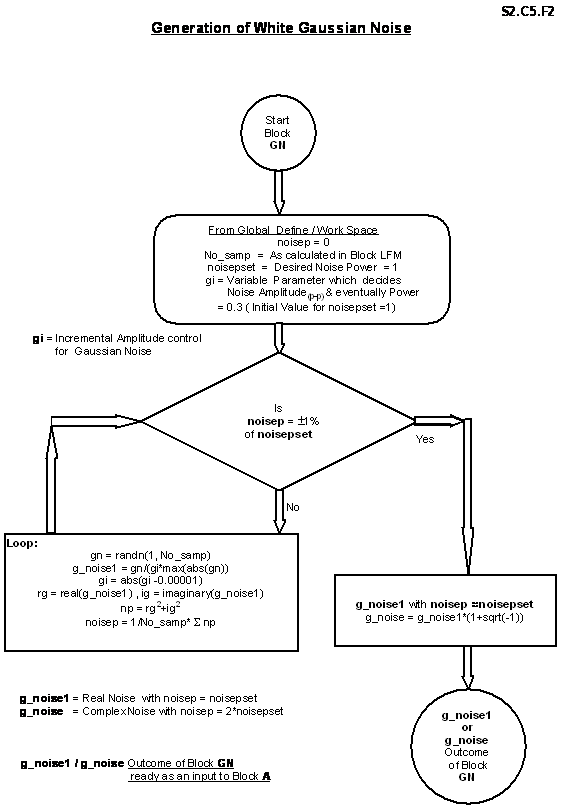
Implementation of Frequency-Domain approach with two possible options is highlighted in Figure S2.C5.B1 (Frequency Weighting FW-FASP) & in S2.C5.B2 (Time Weighting TW-FASP). An Acronym and Program Flow Supplement as shown in Figure S2.C5.T1 gives overview of block wise description, input/output signals and the End Results for both algorithms. Here because of large time-bandwidth LFM signal, both algorithms: weighting in Time & weighting in Frequency are explored. For Match Filtering look-to-look matching is presumed for both cases having the advantage of same position detection-registration. Even the other carried out approach of only central-look matching gives almost same End Results but the different position detection makes registration process more complex.
Both algorithms can be tested,
simulated and further enhanced depending on future requirements with the
M-files fw.m for Frequency Weighting
and tw.m for Time Weighting.
The most important aspect of
Frequency-Domain approach is Block-Processing, different than sample-by-sample
convolution method in Time-Domain approach. Of course the same kind of
correlation analogous to convolution in time is carried out as a multiplication
in Frequency-Domain. Chirp signal generation, AWGN addition and End Results
(Outcomes) determination methods still remain same as Time-Domain approach.
Transformation of Time to Frequency is done through FFT for processing, and
inverse transformation from Frequency to Time is done through IFFT for outcome
analysis. Referring to chapter S2.C4 and Table S2.C4.T3.1 of Time-Domain
approach, for full swath or narrow swath, far-range imaging using
Frequency-Domain approach, 8K FFT is must. Choice of number of IFFT points for
Frequency to Time transformation depends on the desired Azimuth Resolution as
per Table S2.C5.T2. There is no Pre-filtering in both Time Weighted
Frequency-Domain Azimuth Signal Processing (TW-FASP) or in Frequency Weighted
Frequency-Domain Azimuth Signal Processing Approach (FW-FASP).
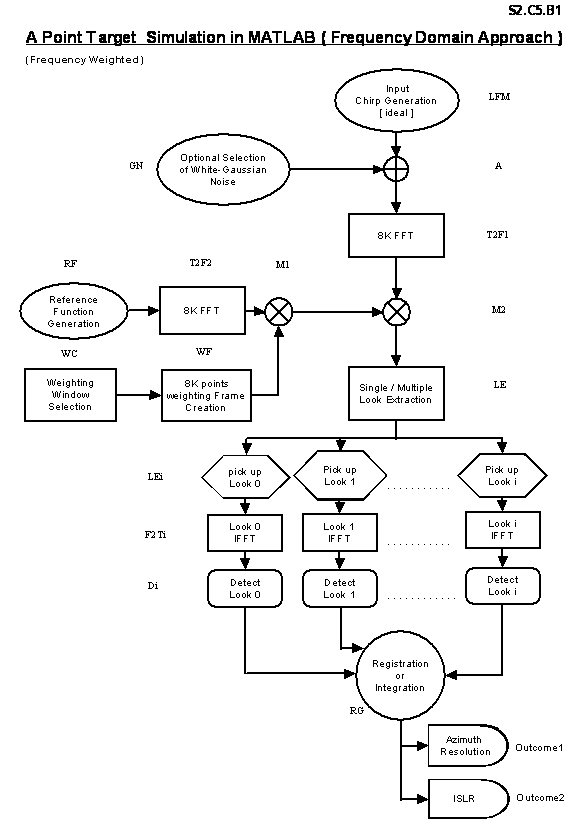
S2.C5.B1

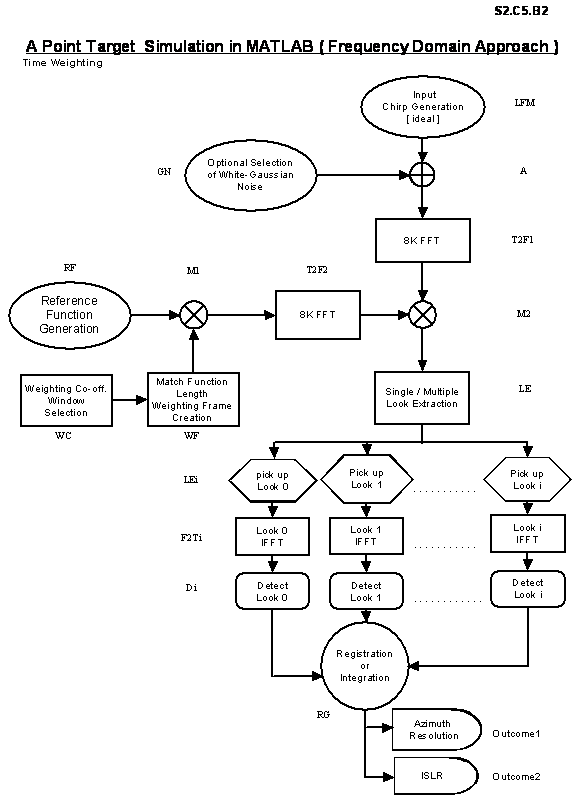
S2.C5.B2
Acronym and Program Flow
Supplement for Frequency-Domain Approach
Frequency Weighting
Block
Acronym
|
Block
Name
|
Description
|
Input to
the Block
|
Output
of the Block
|
Detailed
Flow Diagram
|
|
LFM |
Linear
Frequency Modulation |
Generates
an Ideal Input Chirp Signal |
Runtime R
|
yo |
S2.C5.F1 |
|
GN |
Gaussian
Noise |
Generates
White Gaussian Noise of Specified Power |
Runtime
noise pset |
g_noise1
or g_noise |
S2.C5.F2 |
|
A |
Addition
|
Adds
Ideal Input Chirp & White Gaussian Noise |
yo,
g_noise 1 or g_noise |
y |
S2.C5.F3 |
|
T2F1 |
Time to
Frequency |
Transforms
Noisy Chirp from Time to Frequency-Domain by 8K FFT |
y |
yf |
S2.C5.F4 |
|
RF |
Reference
Function |
Generates
Reference (Match) Function similar but Complex Conjugate of Ideal Input Chirp |
Derived
from Runtime Input to LFM |
mfun |
S2.C5.F5 |
|
T2F2 |
Time to
Frequency |
Transforms
Reference Function from Time to Frequency-Domain by 8K FFT |
mfun |
mfunf |
S2.C5.F6 |
|
WCW |
Weighting
Coeff. Window |
Selects
Weighting Co-eff. Window of suitable length from a given set of Window Types. |
Derived
from Processing bw, prf and FFT size 8K. |
mtwgtd |
S2.C5.F7 |
|
WF |
Weighting
Frame |
Creates
entire 8K Weighting Frame by repetitive placing of Weighting Window |
mtwgtd |
wframe |
S2.C5.F8 |
|
M1 |
Multiply |
Multiplies
8K FFT of Reference Function and 8K Weighting Frame |
mfunf,
wframe |
Full
mulw |
S2.C5.F9 |
|
M2 |
Multiply |
Multiplies
Weighted 8K FFT of Reference Function and 8K FFT of Input Chirp |
fullmulw,
yf |
waves |
S2.C5.F10 |
|
LE/LEi |
Look
Extraction |
Extracts
Single/Multiple Look/Looks of specified processing bw in terms of
Frequency-Domain Sample Points |
waves |
mul0,
mul(i,:) |
S2.C5.F11 |
|
F2Ti |
Frequency
to Time |
Transforms
selected Look/Looks to its equivalent Time-Domain by IFFT |
mul0,
mul(i,:) |
det0c,
detc(i,:) |
S2.C5.F12 |
|
Di |
Detection |
Computes
the Magnitude of Complex Freq. To Time Transformed Look output |
det0c,
detc(i,:) |
det0,
det(i,:) |
S2.C5.F13 |
|
RG |
Registration |
Registers
or Integrates the Single/Multiple Detected output by Non-coherent Averaging |
det0,
det(i,:) |
rg |
S2.C5.F14 |
|
EST3dB |
3dB
Estimation |
Estimates
number of samples with in 3-dB of
max. Registered output. |
rg |
rad |
S2.C5.F15 |
|
Outcome
1 |
Outcome
1 |
Presents
Azimuth Resolution as the First Image Quality Predictor |
rad |
Azres |
S2.C5.F16 |
|
Outcome
2 |
Outcome
2 |
Presents
ISLR as the Second Image Quality Predictor |
rad |
ISLR |
S2.C5.F17 |
S2.C5.T1
Some Important Equations and Sample Calculation Example for FW-FASP
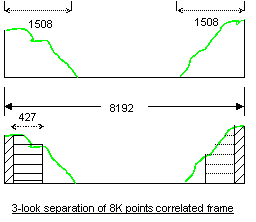
·
Azimuth Resolution (Azres or dAz)
= v/bw
Þ bw
= v/dAz
·
Bandwidth represented by each sample of
8K
correlated frame (sampf) = prf/8K
= 500/8192 = 0.061
·
Total Doppler Bandwidth (TB) = 2.v/l » 184
Hz
Þ
Effective samples for processing = 184/0.061
»
3017 (3016)
Lets take the case of Azimuth
Resolution “better than 6m”
Take bw = 26 hz Þ Expected dAz = 120/26 = 4.61 m (< 6 m)
Number
of samples for IDFT = bw/sampf = 26/0.061 »
427
Number
of samples for IFFT = Next power of 2 of (427) = 512
Number
of Max. looks for IDFT= Truncated integer of [(3016/2)/427 *2] = 7
Number
of Max. looks for IFFT= Truncated integer of [(3016/2)/512 *2] = 5
|
Desired Azimuth Resolution (m) |
Required Processing Bandwidth (Hz) |
Number of IDFT Points/look |
Number of IFFT Points/look |
Max. Possible Looks with IDFT |
Max. Possible Looks with IFFT |
|
10 |
12 |
197 |
256 |
41 à15 |
32 à 11 |
|
6 |
20 |
328 |
512 |
24 à 9 |
16 à 5 |
|
3 |
40 |
656 |
1024 |
12 à 4 |
8 à 2 |
|
1 |
120 |
1968 |
2048 |
4 à1 |
4 à 1 |
|
Better than 6m |
26 |
427 |
512 |
19 à 7 |
16 à 5 |
|
Better than 6m |
31.25 |
512 |
512 |
16 à 5 |
16 à 5 |
S2.C5.T2
S2.C5.2 BLOCKWISE DESCRIPTION
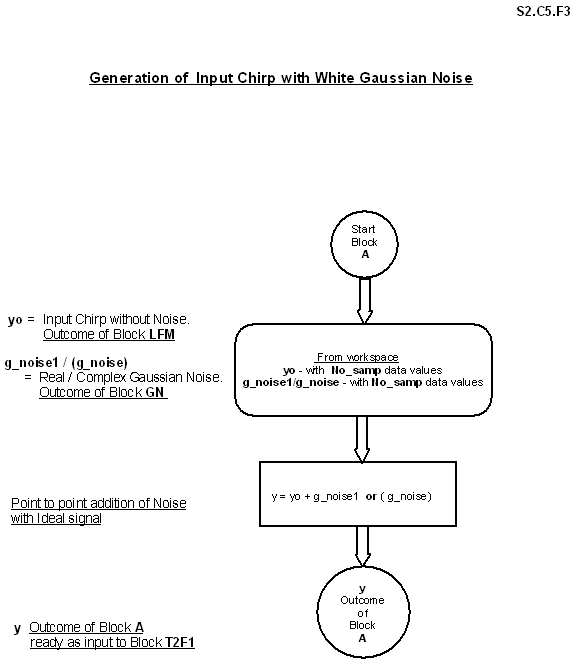
Referring to block diagrams S2.C5.B1 and
S2.C5.B2, several blocks are similar to Time-Domain approach like LFM, GN, A,
RG, Outcome1 and Outcome2. In this approach decimation is not carried out,
hence processing on large data set is involved. The core processing is done in
Frequency-Domain so it is identified as FASP. Generalized functional
description of important blocks for both TW-FASP and FW-FASP is summarized as
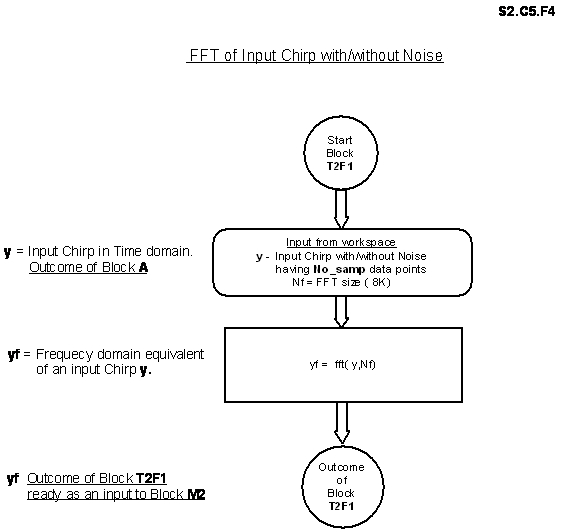
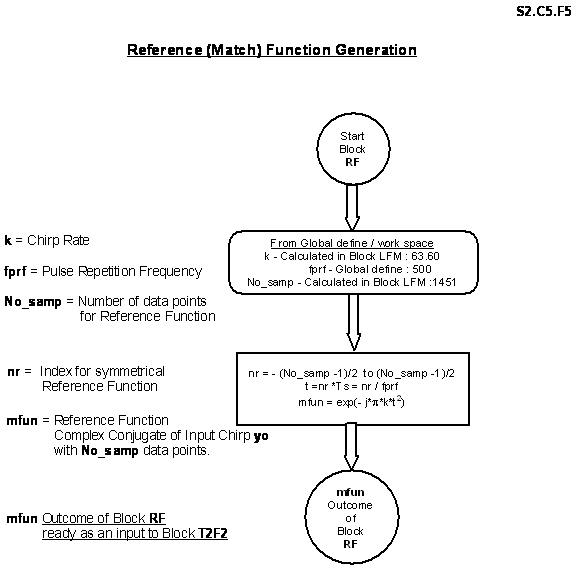
follow. Detailed block wise program flow for FW-FASP is documented in flow
charts S2.C5.F1 to S2.C5.F17.
2.1
Block T2F1 transforms input
Chirp samples of Time-Domain to Frequency-Domain by 8K FFT. The FFT size of 8K
is justified because of the largest data set for far-range (32000m) is above
5000 samples. If the data set is less than 8K, trailing points are padded with
zeros to make the data set size uniform.
2.2
Block RF generates Reference
(Match) Function, similar but complex conjugate of input LFM signal. The data
size is also same as input Chirp signal.
2.3
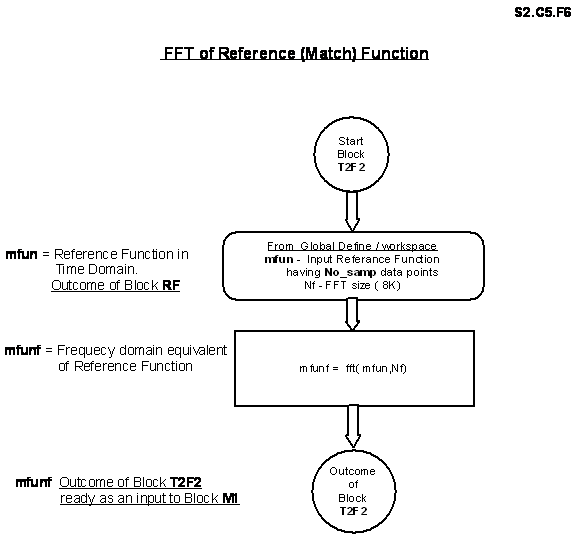
Block T2F2 takes 8K FFT of
Reference Function and transforms it in Frequency-Domain so that the essence of
the whole algorithm i.e. correlation, can be done as a multiplication in
Frequency-Domain.
2.4
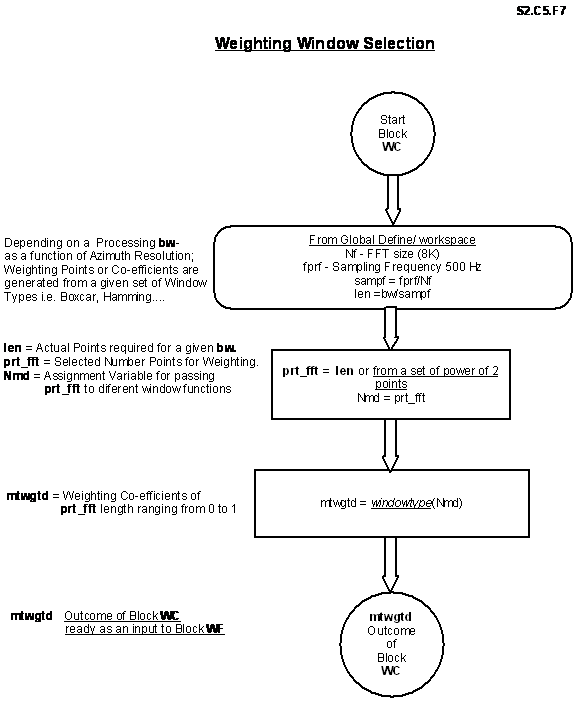
Block WC generates
pre-determined points of Weighting Window Coefficient. Number of weighting
window points is different for both TW-FASP and FW-FASP.
For TW-FASP: Number of points =
No_samp*bw/TB…………………….(2.5.1)
For FW-FASP: Number of points =
bw/(prf/8192) .…………….…………(2.5.2)
These coefficients are responsible for
better ISLR at the cost of broadened main lobe peak response. From a large set
of Windows, generally Hamming or Kaiser Window is selected.
2.5
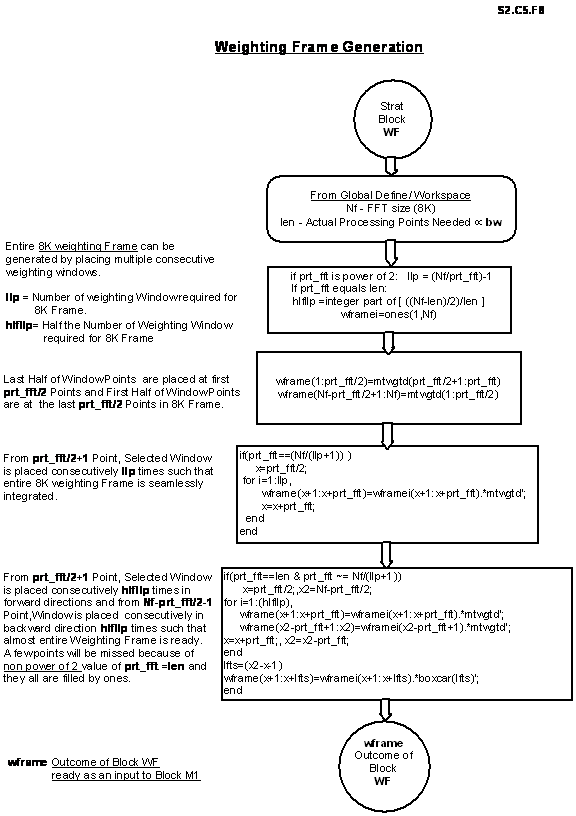
Block WF generates entire
Weighting Frame by repeating weighting window coefficient points over 8K size
for FW-FASP and over Reference Function size for TW-FASP. This Weighting Frame
can be thought of as a shaping mask. For TW-FASP, shaping of Reference Function
is done in time whereas for FW-FASP, shaping is applied on a Frequency-Domain
version of Reference Function.
2.6
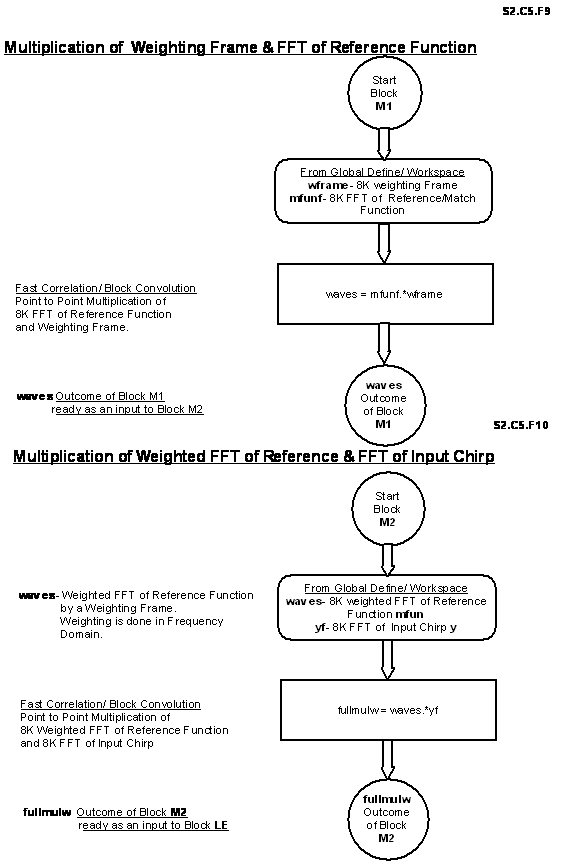
Block M1 performs
above-mentioned shaping of Reference Function. The difference in TW-FASP and
FW-FASP is just the altered positions of blocks T2F2 & M1 as per block
diagrams S2.C5.B1 and S2.C5.B2.
2.7
Block M2 multiplies the
weighted (shaped) Reference Function and input Chirp in Frequency-Domain. This
block corresponds to correlation as a multiplication in Frequency-Domain. From
this block onwards both FASP algorithms are similar.
2.8
Block LE/LEi determines the selection of desired bandwidth (bw)
for a given Azimuth Resolution by picking up a set of weighted points (a look)
from a correlated frame (output from Block M2). Here multi-look processing is
possible with an option LEi by picking up same number of required points but
from different portions (looks) of correlated 8K frame. This multi-look
processing gives better results in the presence of speckle noise and AWGN.
2.9
Block F2Ti again transforms
back the selected looks (by LE/LEi) to Time-Domain by taking IDFT/IFFT on the
extracted look/looks. Depending on the processing bw, number of points of
extracted look may vary and it may not be in power of 2 size, for such cases
IDFT is used or data is padded with zeros to make it next power of 2 size. This
block gives complex peak response in time.
2.10
Block Di is represents
detection and it gives absolute magnitude of the complex peak response. For
single look, there is only one peak response so the detection or registration
is same. For multi-look processing, there are i peak responses but they all are
positioned at a same mark on x-axis because of look-to-look matching.
2.11
Block RG, Outcome1 and Outcome2 are identical as Time-Domain
approach (TASP).
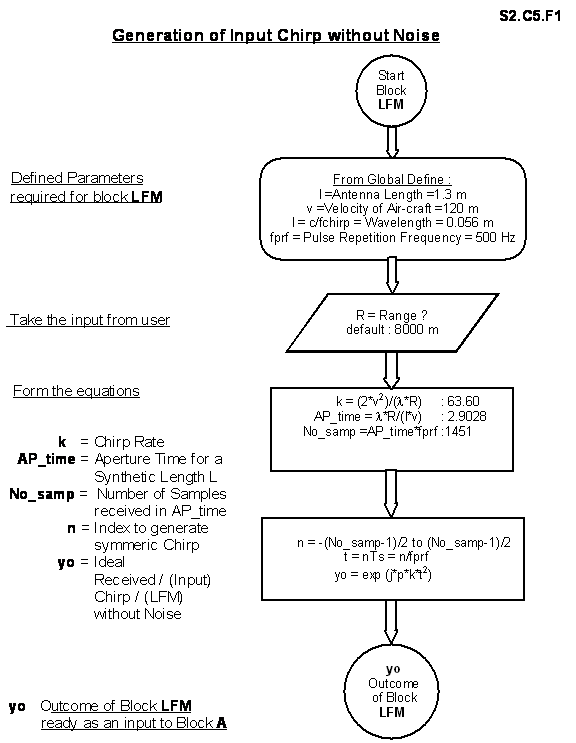
S2.C5.F1

S2.C5.F2

S2.C5.F3
S2.C5.F4

S2.C5.F5

S2.C5.F6

S2.C5.F7

S2.C5.F8

S2.C5.F9, S2.C5.F10

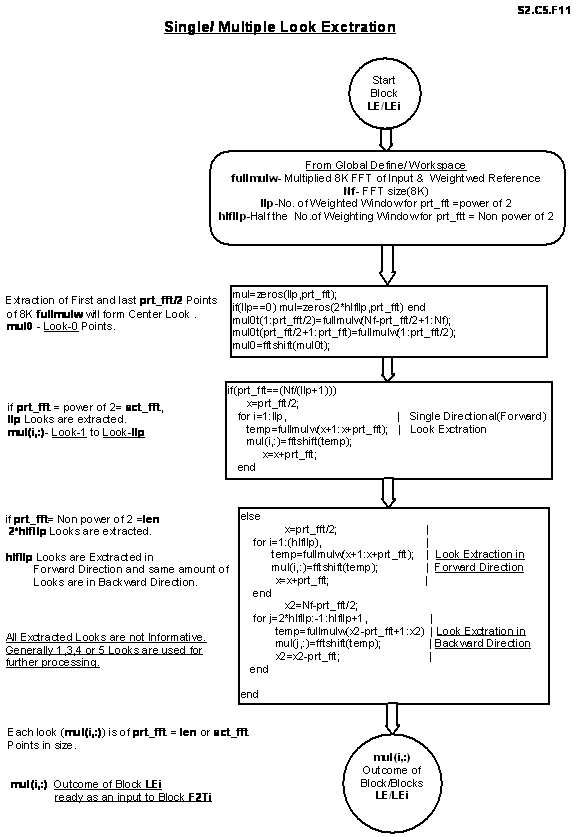
S2.C5.F11
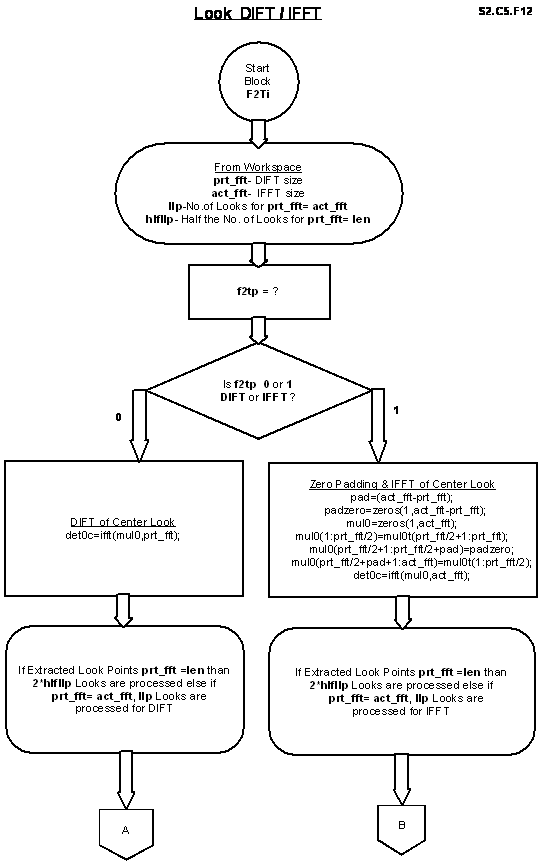
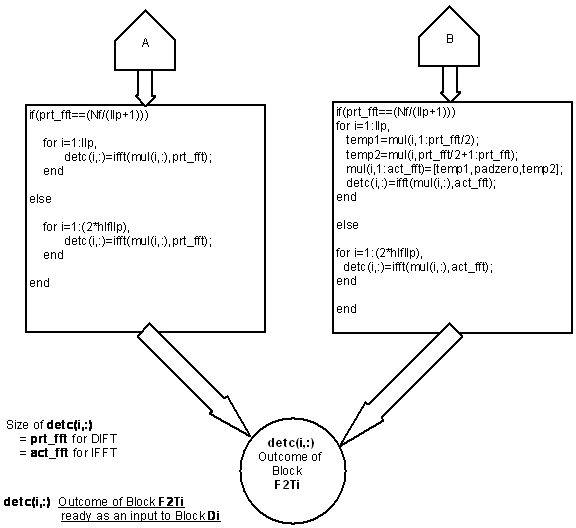
S2.C5.F12

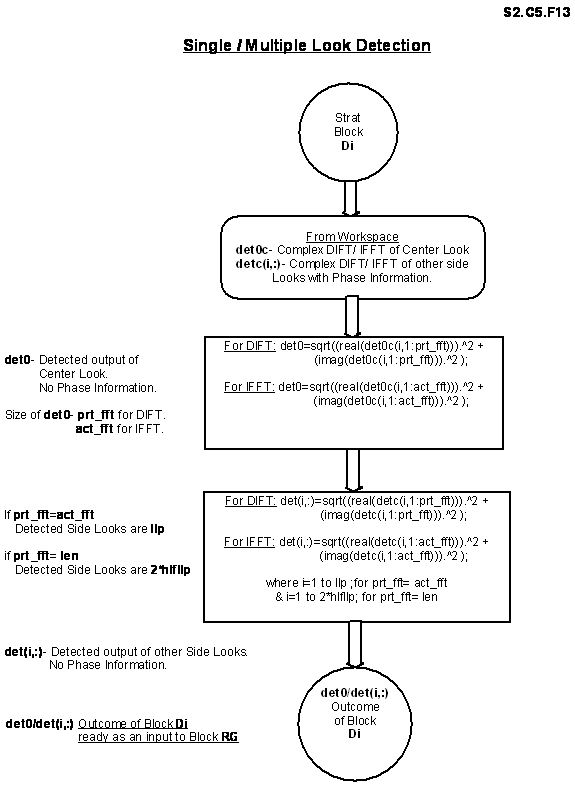
S2.C5.F13
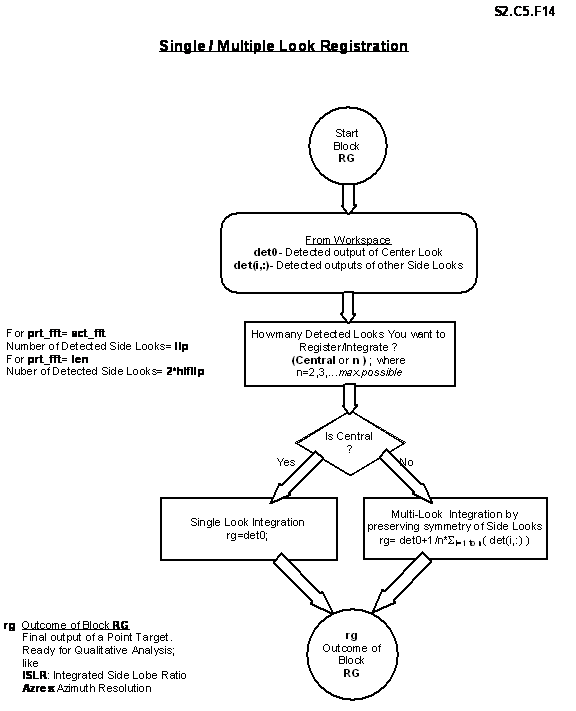
S2.C5.F14
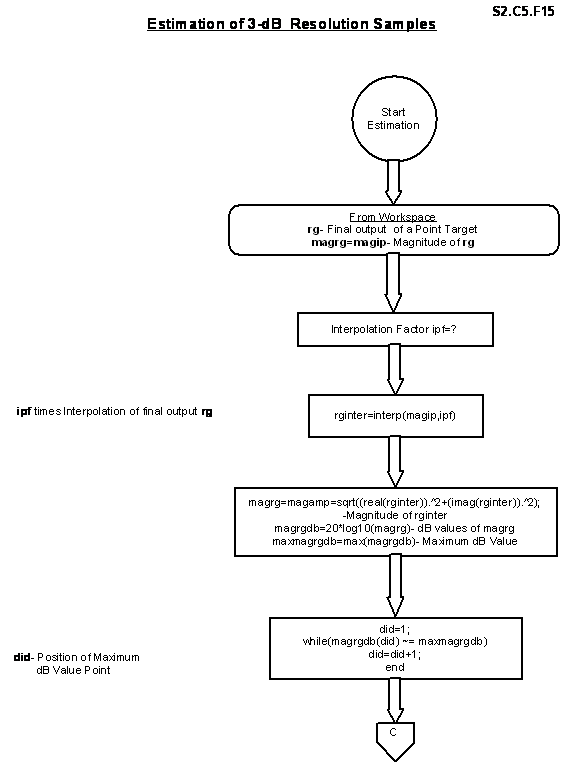
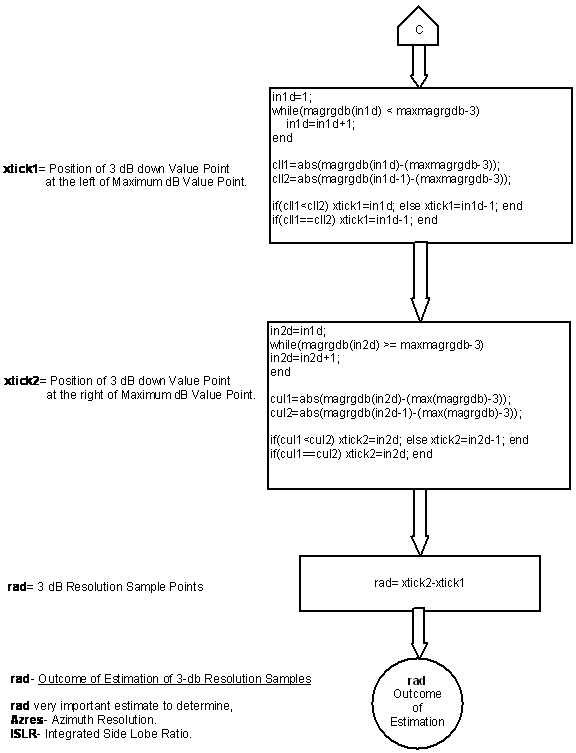
S2.C5.F15

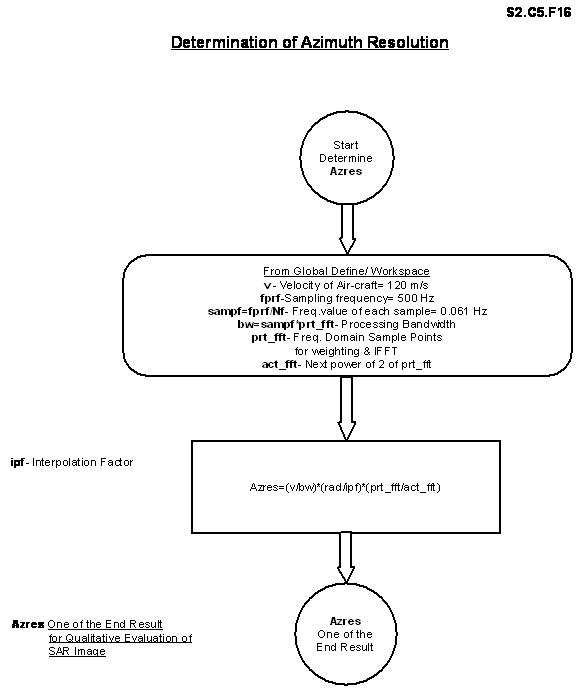
S2.C5.F16

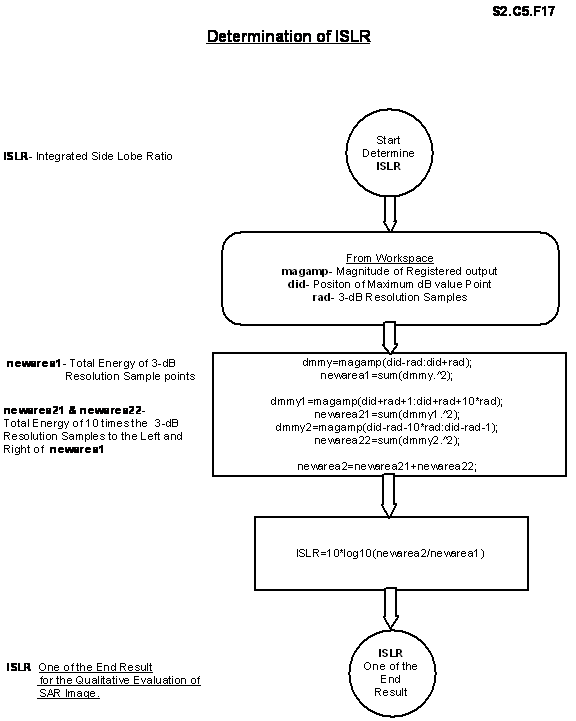
S2.C5.F17
S2.C5.3 RESULTS
End
Results i.e.
1
Azimuth Resolution &
2
ISLR,
for
both TW-FASP & FW-FASP algorithms are tabularized as a representative set
with various parameters like, processing bandwidths (bw), number of IDFT/IFFT
points, Weighting Window, amount of AWGN power etc. to highlight the following
issues.
If nothing is mentioned with the table, it
is assumed that there is no noise, no weighting and central look registration
with Interpolation factor =15.
·
Selected bw =20/26/31.25 Hz with both IDFT and IFFT, with different
weights for both TW-FASP & FW-FASP.
·
256,1024,2048 points single look IFFT with different weights for
FW-FASP.
·
512 points/31.25 Hz with single/3 looks, with different weights in ideal
as well as in noisy environment.
·
Effect of interpolation factor.
3.1 Processing bw = 20/26/31.25
for TW-FASP
S2.C5.T3.1.1 bw=20, central look, TW-FASP
|
Reference Function Weighting |
Peak (dB) |
3-dB resolution samples (ra) |
Azimuth Resolution (Azres) m |
ISLR (dB) |
|
Boxcar |
71.84 |
13 |
5.20 |
-17.60 |
|
Hamming |
68.72 |
15 |
6.00 |
-19.35 |
|
Kaiser |
68.05 |
17 |
6.80 |
-18.19 |
|
Hanning |
65.99 |
21 |
8.40 |
-19.37 |
|
Blackman |
64.37 |
24 |
9.60 |
-18.85 |
|
Dolf-Chebyshev |
67.19 |
18 |
7.20 |
-18.22 |
S2.C5.T3.1.2 bw=26, central look, TW-FASP
|
Reference Function Weighting |
Peak (dB) |
3-dB resolution samples (ra) |
Azimuth Resolution (Azres) m |
ISLR (dB) |
|
Boxcar |
69.62 |
21 |
6.46 |
-8.81 |
|
Hamming |
67.70 |
19 |
5.84 |
-14.83 |
|
Kaiser |
67.43 |
19 |
5.84 |
-16.36 |
|
Hanning |
65.80 |
22 |
6.76 |
-18.62 |
|
Blackman |
64.30 |
26 |
8.00 |
-21.00 |
|
Dolf-Chebyshev |
66.72 |
20 |
6.15 |
-18.41 |
S2.C5.T3.1.3 bw=31.25, central look, TW-FASP
|
Reference Function Weighting |
Peak (dB) |
3-dB resolution samples (ra) |
Azimuth Resolution (Azres) m |
ISLR (dB) |
|
Boxcar |
69.83 |
19 |
4.86 |
-8.52 |
|
Hamming |
67.84 |
18 |
4.60 |
-14.39 |
|
Kaiser |
67.53 |
19 |
4.86 |
-17.86 |
|
Hanning |
65.83 |
21 |
5.37 |
-18.86 |
|
Blackman |
64.34 |
25 |
6.40 |
-20.43 |
|
Dolf-Chebyshev |
66.83 |
20 |
5.12 |
-19.53 |
3.2 Processing bw = 20/26/31.25
for FW-FASP
S2.C5.T3.2.1 bw=20, FW-FASP
|
Ref. Function Weighting |
328 points-IDFT |
512 points -IFFT (Zero padded) |
||||||
|
Peak |
ra |
Azres |
ISLR |
Peak |
ra |
Azres |
ISLR |
|
|
Boxcar |
71.84 |
13 |
5.19 |
-17.60 |
68.14 |
20 |
5.12 |
-10.33 |
|
Hamming |
68.75 |
15 |
5.99 |
-19.47 |
64.96 |
24 |
6.14 |
-16.59 |
|
Kaiser |
68.09 |
17 |
6.79 |
-18.28 |
64.27 |
27 |
6.91 |
-20.48 |
S2.C5.T3.2.2 bw=26, FW-FASP
|
Ref. Function Weighting |
427 points-IDFT |
512 points -IFFT (Zero padded) |
||||||
|
Peak |
ra |
Azres |
ISLR |
Peak |
ra |
Azres |
ISLR |
|
|
Boxcar |
69.62 |
21 |
6.46 |
-8.81 |
69.22 |
20 |
5.12 |
-11.27 |
|
Hamming |
67.81 |
19 |
5.84 |
-15.35 |
66.95 |
19 |
4.86 |
-18.11 |
|
Kaiser |
67.55 |
19 |
5.84 |
-19.45 |
66.42 |
21 |
5.37 |
-21.15 |
S2.C5.T3.2.3 bw=26, 3-looks, FW-FASP
|
Ref. Function Weighting |
427 points-IDFT |
512 points -IFFT (Zero padded) |
||||||
|
Peak |
ra |
Azres |
ISLR |
Peak |
ra |
Azres |
ISLR |
|
|
Boxcar |
69.62 |
21 |
6.46 |
-8.81 |
67.67 |
18 |
4.60 |
-4.40 |
|
Hamming |
67.81 |
19 |
5.84 |
-15.36 |
65.44 |
18 |
4.60 |
-5.12 |
|
Kaiser |
66.55 |
19 |
5.84 |
-19.45 |
65.15 |
17 |
4.35 |
-4.47 |
S2.C5.T3.2.4 bw=31.25, FW-FASP
|
Ref. Function Weighting |
512 points-IDFT |
512 points -IFFT |
||||||
|
Peak |
ra |
Azres |
ISLR |
Peak |
ra |
Azres |
ISLR |
|
|
Boxcar |
69.88 |
19 |
4.86 |
-8.52 |
69.88 |
19 |
4.86 |
-8.52 |
|
Hamming |
67.89 |
18 |
4.60 |
-14.54 |
67.89 |
18 |
4.60 |
-14.54 |
|
Kaiser |
67.88 |
19 |
4.86 |
-19.78 |
67.88 |
18 |
4.86 |
-19.78 |
S2.C5.T3.2.5 bw=31.25, 3-looks, FW-FASP
|
Ref. Function Weighting |
512 points-IDFT |
512 points -IFFT |
||||||
|
Peak |
ra |
Azres |
ISLR |
Peak |
ra |
Azres |
ISLR |
|
|
Boxcar |
69.88 |
19 |
4.86 |
-8.53 |
69.88 |
19 |
4.86 |
-8.53 |
|
Hamming |
67.89 |
18 |
4.60 |
-14.54 |
67.89 |
18 |
4.60 |
-14.54 |
|
Kaiser |
67.88 |
19 |
4.86 |
-19.78 |
67.88 |
19 |
4.86 |
-19.78 |
3.3 256/ 1024(62.5 Hz) / 2048(125Hz) points IFFT
with FW-FASP
S2.C5.T3.3.1 256 points IFFT
|
Ref. Function Weighting |
Peak (dB) |
3-dB resolution samples (ra) |
Azimuth Resolution (Azres) m |
ISLR (dB) |
|
Boxcar |
70.48 |
17 |
8.70 |
-9.22 |
|
Hamming |
68.11 |
18 |
9.21 |
-14.79 |
|
Kaiser |
67.85 |
18 |
9.21 |
-18.38 |
S2.C5.T3.3.2 1024(62.5Hz) points IFFT
|
Ref. Function Weighting |
Peak (dB) |
3-dB resolution samples (ra) |
Azimuth Resolution (Azres) m |
ISLR (dB) |
|
Boxcar |
70.98 |
16 |
2.04 |
-10.85 |
|
Hamming |
68.30 |
16 |
2.04 |
-14.42 |
|
Kaiser |
67.78 |
18 |
2.30 |
-18.41 |
S2.C5.T3.3.3 2048 (125Hz) points IFFT
|
Ref. Function Weighting |
Peak (dB) |
3-dB resolution samples (ra) |
Azimuth Resolution (Azres) m |
ISLR (dB) |
|
Boxcar |
69.09 |
23 |
1.47 |
-9.07 |
|
Hamming |
67.65 |
19 |
1.21 |
-15.57 |
|
Kaiser |
67.53 |
19 |
1.21 |
-20.16 |
S2.C5.T3.3.4 184.61 Hz with IDFT
|
Ref. Function Weighting |
Peak (dB) |
3-dB resolution samples (ra) |
Azimuth Resolution (Azres) m |
ISLR (dB) |
|
Boxcar |
69.89 |
20 |
0.86 |
-8.35 |
|
Hamming |
67.84 |
19 |
0.82 |
-15.23 |
|
Kaiser |
67.57 |
19 |
0.82 |
-19.35 |
3.4 Processing bw = 62.5/120/125/184.61 for
TW-FASP
S2.C5.T3.4.1 bw=62.5
|
Ref. Function Weighting |
Peak (dB) |
3-dB resolution samples (ra) |
Azimuth Resolution (Azres) m |
ISLR (dB) |
|
Boxcar |
71.73 |
14 |
1.79 |
-17.37 |
|
Hamming |
68.87 |
16 |
2.04 |
-18.79 |
|
Kaiser |
68.04 |
17 |
2.17 |
-17.46 |
S2.C5.T3.4.2 bw=120
|
Ref. Function Weighting |
Peak (dB) |
3-dB resolution samples (ra) |
Azimuth Resolution (Azres) m |
ISLR (dB) |
|
Boxcar |
71.89 |
12 |
0.80 |
-15.60 |
|
Hamming |
68.82 |
15 |
1.00 |
-20.78 |
|
Kaiser |
68.19 |
16 |
1.06 |
-17.68 |
S2.C5.T3.4.3 bw=125
|
Ref. Function Weighting |
Peak (dB) |
3-dB resolution samples (ra) |
Azimuth Resolution (Azres) m |
ISLR (dB) |
|
Boxcar |
71.59 |
14 |
0.89 |
-15.12 |
|
Hamming |
68.61 |
15 |
0.96 |
-16.27 |
|
Kaiser |
68.01 |
17 |
1.08 |
-17.01 |
S2.C5.T3.4.4 bw=184.61
|
Ref. Function Weighting |
Peak (dB) |
3-dB resolution samples (ra) |
Azimuth Resolution (Azres) m |
ISLR (dB) |
|
Boxcar |
70.88 |
16 |
0.69 |
-10.22 |
|
Hamming |
68.68 |
16 |
0.69 |
-13.98 |
|
Kaiser |
67.78 |
18 |
0.78 |
-18.07 |
3.5 512 points / (bw = 31.25Hz) IFFT for FW-FASP
with Noise
S2.C5.T3.5.1 Real Noise Power: 1 (case 1)
|
Ref. Function Weighting |
Peak (dB) |
3-dB resolution samples (ra) |
Azimuth Resolution (Azres) m |
ISLR (dB) |
|
Boxcar |
69.84 |
18 |
4.60 |
-5.21 |
|
Hamming |
67.17 |
17 |
4.35 |
-6.90 |
|
Kaiser |
67.10 |
19 |
4.86 |
-6.97 |
S2.C5.T3.5.2 Real Noise Power: 1 (case 2)
|
Ref. Function Weighting |
Peak (dB) |
3-dB resolution samples (ra) |
Azimuth Resolution (Azres) m |
ISLR (dB) |
|
Boxcar |
69.29 |
19 |
4.86 |
-4.85 |
|
Hamming |
67.22 |
18 |
4.60 |
-6.00 |
|
Kaiser |
66.92 |
19 |
4.86 |
-6.21 |
S2.C5.T3.5.3 Complex Noise Power: 1 (case 1)
|
Ref. Function Weighting |
Peak (dB) |
3-dB resolution samples (ra) |
Azimuth Resolution (Azres) m |
ISLR (dB) |
|
Boxcar |
69.84 |
18 |
4.60 |
-6.25 |
|
Hamming |
67.60 |
18 |
4.60 |
-8.98 |
|
Kaiser |
67.22 |
19 |
4.86 |
-9.83 |
S2.C5.T3.5.4 Complex Noise Power: 1 (case 2)
|
Ref. Function Weighting |
Peak (dB) |
3-dB resolution samples (ra) |
Azimuth Resolution (Azres) m |
ISLR (dB) |
|
Boxcar |
69.06 |
19 |
4.86 |
-4.65 |
|
Hamming |
67.27 |
18 |
4.60 |
-7.53 |
|
Kaiser |
66.90 |
19 |
4.86 |
-8.34 |
S2.C5.T3.5.5 Real Noise Power: 2 (case 1)
|
Ref. Function Weighting |
Peak (dB) |
3-dB resolution samples (ra) |
Azimuth Resolution (Azres) m |
ISLR (dB) |
|
Boxcar |
69.98 |
19 |
4.86 |
-3.19 |
|
Hamming |
68.21 |
19 |
4.86 |
-3.16 |
|
Kaiser |
67.89 |
20 |
5.12 |
-3.65 |
S2.C5.T3.5.6 Real Noise Power: 2 (case 2)
|
Ref. Function Weighting |
Peak (dB) |
3-dB resolution samples (ra) |
Azimuth Resolution (Azres) m |
ISLR (dB) |
|
Boxcar |
70.29 |
22 |
5.63 |
-4.94 |
|
Hamming |
68.72 |
19 |
4.86 |
-6.01 |
|
Kaiser |
68.50 |
19 |
4.86 |
-6.71 |
S2.C5.T3.5.7 Complex
Noise Power: 2 (case 1)
|
Ref. Function Weighting |
Peak (dB) |
3-dB resolution samples (ra) |
Azimuth Resolution (Azres) m |
ISLR (dB) |
|
Boxcar |
69.80 |
20 |
5.12 |
-4.78 |
|
Hamming |
67.96 |
19 |
4.86 |
-7.13 |
|
Kaiser |
67.71 |
19 |
4.86 |
-7.80 |
S2.C5.T3.5.8 Complex Noise Power: 2 (case 2)
|
Ref. Function Weighting |
Peak (dB) |
3-dB resolution samples (ra) |
Azimuth Resolution (Azres) m |
ISLR (dB) |
|
Boxcar |
70.64 |
18 |
4.60 |
-5.91 |
|
Hamming |
68.37 |
18 |
4.60 |
-8.22 |
|
Kaiser |
67.99 |
19 |
4.86 |
-8.89 |
3.6 Effect
of Interpolation Factor on End-Results (Outcomes) with
512 points IFFT / (bw=31.25Hz) for FW-FASP.
S2.C5.T3.6
|
Interpolation Factor |
3-dB
resolution samples (ra) |
Azimuth
Resolution (Azres) m |
ISLR (dB) |
|
1 |
1 |
3.84 |
-9.33 |
|
2 |
3 |
5.76 |
-9.77 |
|
3 |
3 |
3.84 |
-7.47 |
|
4 |
5 |
4.80 |
-8.47 |
|
5 |
6 |
4.60 |
-8.72 |
|
10 |
13 |
4.99 |
-8.65 |
|
15 |
19 |
4.86 |
-8.52 |
|
20 |
26 |
4.99 |
-8.53 |
|
25 |
32 |
4.91 |
-8.48 |
|
30 |
39 |
4.99 |
-8.59 |
|
35 |
45 |
4.93 |
-8.46 |
|
40 |
51 |
4.89 |
-8.94 |
|
45 |
56 |
4.94 |
-8.52 |
|
50 |
64 |
4.91 |
-8.43 |
|
60 |
77 |
4.92 |
-8.43 |
|
70 |
90 |
4.93 |
-8.47 |
|
100 |
129 |
4.95 |
-8.45 |
S2.C5.4 INTERPRETATIONS
Based on the tabularized
representative result set S2.C5.3 derived from Frequency-Domain Azimuth Signal
Processing Approach (FASP), important comments/interpretations are deduced as
below.
Ø
Almost comparable End Results are achieved with either of TW-FASP or
FW-FASP. (Tables of 3.1 and 3.2)
Ø
Because of large time-bandwidth Reference LFM signal, weighting in Time
and weighting in Frequency are functionally almost equivalent. For actual
implementation FW-FASP is less computationally involved, less complex and hence
more suitable for on-line Real-time approach. (Block diagrams S2.C5.B1 and
S2.C5.B2)
Ø
Effect of weighting is quite clear on Azimuth Resolution and ISLR.
(Tables of 3.1 to 3.4)
Ø
In case of FW-FASP, for processing bw with number of samples not equal
to power of two, ISLR is poor with more zero padded IFFT compare to IDFT. Zero
padded IFFT gives better Azimuth Resolution compare to IDFT at the cost of
variable ISLR depending on zero padding. (Tables of 3.2)
Ø
For multi-look processing zero padded IFFT gives very poor ISLR, hence
it should be avoided. (Tables of 3.2)
Ø
For both TW-FASP and FW-FASP, processing bw should be selected in such a
way that each single/multiple extracted look will have power of 2 sample
points. In this condition, without zero padding, IFFT can be evaluated for
optimum End Results. Multi-look processing with no zero padded IFFT helps in
noise smoothing and in improving ISLR under AWGN environment. (Tables of 3.2,
3.3 and 3.4)
Ø
FW-FASP with IDFT gives same Azimuth Resolution but marginally better
ISLR compare to TW-FASP with different weights for small bw. (Tables of 3.1 and
3.2)
Ø
For large bw, FW-FASP gives marginally poor Azimuth Resolution, poor
ISLR without weighting, but gives comparable Azimuth Resolution and better ISLR
with Kaiser weighting than TW-FASP. (Tables of 3.3 and 3.4)
Ø
Hamming weighting gives less broadening than Kaiser weighting but
significantly poor ISLR. Kaiser weighting is favorable choice for better ISLR,
and Hamming weighting is for Azimuth Resolution. (Tables of 3.1, 3.2 and 3.4)
Ø
For Real-time implementation, on-line computation of Hamming coefficient
is faster and optimum, whereas for pre-stored weighted Reference Function,
Kaiser window is the optimum choice.
Ø
Under AWGN of equal signal power, twice the signal power or equal to
moderately high signal powers, Azimuth Resolution remains almost constant
without much deterioration but ISLR has large effects in Real and Complex noise
situations. (Tables of 3.5)
Ø
Reference Function weighting and multi-look processing are very
important techniques to fight with AWGN.
Ø
Finally for a given requirement of better than 6m Azimuth Resolution,
processing bw = 31.25 Hz gives 512 look extracted sample points, suitable for
multi-look FW-FASP approach with Hamming/Kaiser weighting depending on the
implementation convenience. (Tables S2.C5.T3.2.4 and S2.C5.T3.2.5)
Ø
Interpolation of registered data for determination of End Results should
be done with a reasonably large factor to have better consistency and
stability. (Table of 3.6 and Figure S2.C5.D1)
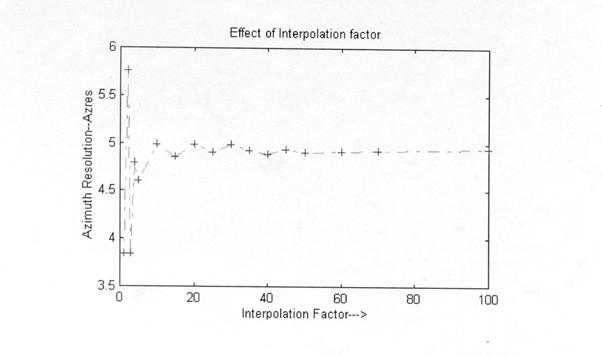
S2.C5.D1
CHAPTER 6: COMPARISION,
CONCLUSION & FUTURE PATH
S2.C6.1 COMPARISION
For both Azimuth
correlation approaches,
1
TASP (Time-Domain Azimuth Signal Processing) and
2
FASP (Frequency-Domain Azimuth Signal Processing)
As described in Chapter 4
and Chapter 5 with the simulated results of S2.C4.3 and S2.C5.3, and individual
interpretations of S2.C4.4 and S2.C5.4, keeping in front, the relative
comparison, conclusion and future path are summarized as below.
Ø
TASP is suitable for sample by sample processing
approach whereas FASP advocates block-processing methodology.
Ø
TASP is characterized by large and redundant
computations with time trade-off because of significant processing time
variations for wide-swath near-to-far range conditions. FASP is characterized
by less computational involvement with memory trade-off because of entire
aperture data storage requirement for block-processing.
Ø
TASP is ideal, model, and simpler algorithm with
minimal processing artifacts. It is carried out in a single-uniform and natural
domain i.e. Time. FASP is the derived form of TASP because of the inverse and
bi-directional relationship between Time and Frequency. FASP is switched
between time to frequency and frequency to time by mathematically bounded,
finite length, discrete and less precise transformation tools like FFT and
IFFT, which contribute more artifacts to the End Results.
Ø
TASP gives better End Results than both the variants
of FASP. It is an ideal choice to confirm and visualize the effect of
processing parameter variations just using a prototype project configuration
with a small data set of known pattern. FASP is generally feasible with
practically acceptable tolerances for the actual implementation over a massive
data set received with unknown stoic behavior.
Ø
On the basis of available memory and time, the
selection should be…
·
Memory: Sufficiently
large à FASP
Relatively
less à TASP
·
Time: On-line/Sample
wise/Fast à TASP with
Hamming weighting
Pre-stored/
Block wise /Moderate à FASP with Kaiser weighting
On-line/Block
wise/Fast à FASP with
Hamming weighting
Ø
Data skewing effect due to Range-Walk Curvature or
Range Cell Migration has to be minimized for high-resolution SAR imaging
through RCMC. Since RCMC is convenient and faster to perform in
Frequency-Domain for high-resolution requirement, where, there is no way to get
rid of RCMC, FASP is the obvious choice.
S2.C6.2 CONCLUSION
The decision to adopt
either TASP or FASP for actual Real-time implementation is mainly governed by
the available hardware technology (DSP processor, Memory) with its throughput
delivery speed and cost, and by the justifiable requirement/need to approach as
near as possible towards Real-time processing.
Expected quality and resolution of the image are also considerable
driving forces.
S2.C6.3 FUTURE PATH
è
Some more window functions should be explored with better
Main lobe–Side lobe characteristics.
è
Both TASP and FASP can be reconsidered with
multiplicative speckle models.
è
Simulations of other relevant issues like Motion
Compensation, RCMC, Geometric and Radiometric Corrections are also equally
challenging.
è
Third possible Azimuth Correlation algorithm i.e.,
SPECAN (De-ramping) should be simulated to confirm its proposed trade-off
ability with TASP and FASP.